Category Archives: SQLServerPedia Syndication

How many .MDF Files did you say?

How many File Groups?

It isn’t abnormal in the line of business that I am in to run across a past vendor who has set up a SQL Database, train the users on the application, then depart off to the wild blue yonder leaving the DB’s in the hands of the company’s DBA team on site. Not long ago this very same scenario came about, once the vendor had departed I was curious as to what they had done; and since now I’m responsible for the maintenance, issues, etc I figured it would behoove me to check it out.

I found a 3 GB Database which is cool; checking out the file groups I discovered over 300 .MDF files had been created. My initial gut instinct was one of why, but as I got into further research I can see where they were going with this. The sliding window approach was utilized by this vendor because of two reason upon me asking them…….one they had one architect and that is what they used; and two that is how their app interacts with the product on the back end. I figured given their answer a more prudent search was merited for my own purposes. I was intrigued……

In researching I came up with a few reasons that multiple data files would be utilized

  1. Performance increases
  2. Parallelism
  3. Rolling off extinct data

Now, I’m sure that there are more than just three gains that can be brought up; however in my case these were the ones that stood out.

I can see that if tables/indexes were placed onto separate file groups that it would allow for better performance from a complex queries standpoint in that SQL Server can utilize the “in” parallel I/O operations. I can also see that if the app is doing obsolete removal of data that separate partitioning can be utilized pretty heavily.

All in all I found that that their are some perks to having multiple File Groups. I’m not totally sold on having over 300 data files for a 3 GB Database; however I do see some valid points on to use this type of methodology against a database that is very large along with complex queries hitting the database.

I think it goes without question that thorough testing should be completed when using multiple file groups. Just because it works well in one environment does not mean it will work as well in the other, and I also want to STRONGLY recommend that you don’t decide to make this jump in a prod environment. I would hope that is given but always like to re-iterate. Some formal testing in my opinion should occur first.
Utilizing SQL CMD Variables in Transactional Replication

In some situations it maybe necessary to use SQL CMD variables while executing scripts. This happens when utilizing a replication process I have. To start off with I must iterate that to use SQL CMD variables you have to have the setting actually turned on in SSMS. The enabling is pretty simple and can be viewed on MSDN’s site at the following location.

http://msdn.microsoft.com/en-us/library/aa833182.aspx

If you start to use SQL CMD variables while this setting is turned off than a syntax error will occur when attempting to check the syntax or run the script.

In my situation I have several environments that I can deploy to; each environment has set SQL CMD Variables such as:

–local
:setvar Pub_Server “[(local)]”
:setvar Sub_Server “[(local)\Reporting]”
:setvar PostSnapshotScript “index file location”

I have four more settings like this one for my other environments that are commented out. I can easily flip the switch at any time.

From the statement above I am setting my SQL CMD variables for my publisher (local server) to my subscriber (local\reporting server) utilizing some index files I have at a location on my C:\ As I move through my environments of course these settings will change.

Once I have my environment variables in place I utilize 3 more variables for setting the publication name, the database the replication is occurring in, and the subscribers database:

:setvar Pub_Name “Name of Publication”
:setvar Repl_TRS “Database Name”
:setvar SubscriberDB “Subscribers Database (reporting side)”

I will not go into the specifics of the internals of the script that deploys out the replication; that in and of itself will need to be a different post. I plan on disecting the internals in the near future. However to utilize these variables throughout the script you reference them by using the following methodology:

exec sp_addarticle @publication = $(Pub_name) and so on………

I found this approach very fast and simple.

SQL Saturday #122

SQL Saturday #122 is fast approaching! Don’t forget it is set for July 21, 2012 in Louisville, KY. The event is being held at the University of Louisville School of Business. The formal address is:

University of Louisville School of Business

2301 3rd Street

Louisville, Ky 40202

As of the 24th they still had available seating left. As time approaches more information will be available regarding the speakers, track, and session titles. For more information you can check out SQLSaturday.com or for specific inquiries email the SQL Saturday team at sqlsaturday122@sqlsaturday.com

To take a quote directly from the SQLSaturday site:

“PASS SQLSaturday’s are free 1-day training events for SQL Server professionals that focus on local speakers, providing a variety of high-quality technical sessions, and making it all happen through the efforts of volunteers. Whether you’re attending a SQLSaturday or thinking about hosting your own, we think you’ll find it’s a great way to spend a Saturday – or any day.”

Take advantage of these free training sessions; come learn from some of the top notch speakers in the area. Hope to see you there.

For MapQuest directions you may go here

Automating Startup of Replication Agents

In my business world we utilize Transactional Replication to copy data from our OLTP to another box for Reporting purposes. For a little background on replication I will quote directly from MSDN what transactional replication is http://msdn.microsoft.com/en-us/library/ms151198.aspx:

Replication At a Glance

“Replication is a set of technologies for copying and distributing data and database objects from one database to another and then synchronizing between databases to maintain consistency. Using replication, you can distribute data to different locations and to remote or mobile users over local and wide area networks, dial-up connections, wireless connections, and the Internet.

Transactional replication is typically used in server-to-server scenarios that require high throughput, including: improving scalability and availability; data warehousing and reporting; integrating data from multiple sites; integrating heterogeneous data; and offloading batch processing. Merge replication is primarily designed for mobile applications or distributed server applications that have possible data conflicts. Common scenarios include: exchanging data with mobile users; consumer point of sale (POS) applications; and integration of data from multiple sites. Snapshot replication is used to provide the initial data set for transactional and merge replication; it can also be used when complete refreshes of data are appropriate. With these three types of replication, SQL Server provides a powerful and flexible system for synchronizing data across your enterprise.”

Now that an explanation of what replication is about I can dive further into the steps I’ve taken to automate my own replication. Within replication there are publications that reside on the publishers side (where the data is being copied from) and subscriptions on the receiving side (where the data is being copied to). In my current set up I have 18 publishers. Since this post is regarding Automation I will not go into how to manually start the agent via the Replication Monitor.

I created 18 SQL files that correspond to my 18 Publications. Within my sql files I have the following:

Use [DBName]

Go

Declare @publication VARCHAR(50)

SET @publication = [PublicationName]

EXEC sp_startpublication_snapshot @publication = @publication

GO

This allows me to have 18 seperate start up files; now can I have one file instead of 18. Sure I can; however in some instances I only want to run maybe 1 or 2 so to keep this automated I have seperated mine out. To execute these I have multiple options. I can use my Redgate SQL Multi Script utility that I have at my disposal (which I have done in the past); however I have also created a SSIS package. The SISS package calls a .BAT file with the following contents:

for %%G in (*.sql) do sqlcmd /S (local) -E -i”%%G”

Within my SSIS package I point the running of this command to the directory where I store all my publications; the command executes in this case all sql files (*.sql) to my local environment.

Once the process completes all my agents are started and the snapshot generation is underway.

Database Backups ~ Good or Bad?

I recently responded to a post on SQL Server Central regarding upgrading SQL Server 2005 to SQL Server 2008 R2. The suggestions laid out before my post were spot on; it was the one that came after my response of “agreeing” that backups were important……their is an age old saying I’ve always heard of “You’re only good as your last backup”. The response I pondered on this weekend was from a user who said, “Backups are worthless; restores are priceless“. Being the analytical person that I am I decided to dive into this statement for myself. I can only conclude that in order to do the priceless restore you first must have the worthless backup to restore. So, for me personally I cannot justify backups as being worthless.

I hope DR plans never have to be used but we live in a world that has error so it could be inevitable. No one knows when a disaster will strike, heck we just experienced one of the worst tornado’s around my area since 1974. Stuff happens, the world doesn’t stop turning so as a DBA I better be making sure that our systems have solid backups.

Backups should be pretty obvious, to have a back up is essential in order to recover ( to even be able to do the restore ) from most disasters. Backups aren’t just needed for disasters; think about upgrades gone bad, system issues, or even table corruption.

I know I probably shouldn’t have read to much into the statement, but to me that is a pretty big ordeal when hearing backups are worthless. I’d be interested to here from others what their thoughts are on backups and strategies, do you think they are worth it?

I won’t dive into the different methodologies of backing up databases; that would need to be an entirely different post, I personally like a good backup strategy and for any DR plan in place you need to have a good one. I also, like the idea of routinely verifying backups by restoring them to a DBA sandbox so to speak.

In any sense have a good one guys, thanks for listening to my ramblings on the matter!

Are Developers Data Scripts Standard?

In all my years experience with SQL and being a developer before transitioning to become a DBA I will answer for me personally NO. Each developer has their own niche or style that they use when writing code. I’ve seen some pretty wild and insane ways people develop. I worked with one guy several years ago who would name his counters off t.v. shows so every now and then you might have a skipper or a s.s. minnow thrown in. I hope and trust that development teams have set their own standards better than the one we had years ago…..however even with standards I think as a DBA we need to be able to communicate and bridge the gap that it just makes sense that when you receive a data script or migration script that it is in an expected format than everyone adheres and agrees to with no gotchas.

Recently this standard below was presented; given what the business needs are the script will allow for multiple servers that the script will be allow on. This is particular handy since some people may or may not accidentally run the script on an environment it shouldn’t be ran on. This also is helpful in dealing with a CMS server.

USE [DBName]

IF @@SERVERNAME IN (‘ServerName’,’ServerName’) /*Enter Valid Server Name/Instance*/

  BEGIN

    BEGIN TRY

      BEGIN TRANSACTION

      /*Enter Code*/

      COMMIT TRANSACTION

      PRINT‘Successfully committed!’

    End TRY

    BEGIN CATCH

      ROLLBACK TRANSACTION

      PRINT ‘An error has occurred.  Rolled back!’

      PRINT ERROR_MESSAGE()

    END CATCH

  END

ELSE

  BEGIN

    PRINT ‘PLEASE EXECUTE ON ServerName ONLY!’ /*change server name*/

  END

Whatever your choice of a standard is work toward getting things streamlined and laid out so there are not variations of the same kind of step. When it is up front and in your face as a standard it is easier to follow and maintain.

Removing Read Only Attribute From Files Using SSIS

Recently, I had built an SSIS package that searches my TFS structure after getting the latest version. I had many files I needed to bring over to one location; so to do this I built out a simple SSIS package. I failed to realize that when I bring my files down from TFS to my local environment they are protected as read only. This causes me a problem as I am not able to clear out my repository directory ~ you will inevitably get a “permission denied” error.

To prohibit manual intervention every time I perform this action I tacked on a Script Task property to my package. The basic flow of the package is as follows:

  • Check if my landing zone (repository) is available. If it is then use the existing directory if it is not than create it.
  • If there are any files in the directory prior to bringing over my new files than obliterate them from the directory.
  • Grab 16 various files from different locations and drop them into the landing zone.
  • Turn off the read only attribute of the files brought over.
  • Rinse and repeat as needed.

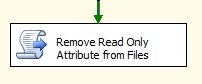
It is in step 5 where I turn off the read only attribute. As you can see the file system task in my package is below:

Read Only Attribute (Script Task)

By double clicking the Script Task you will be taken to a Script Task Editor screen. Simply click on “Edit Script”:

Edit Script Task

After clicking on the “Edit Script” button you will be taken to an SSIS Script editor. The below code provides a simple way of removing the read only attribute; in my beta version I have left the value hard-coded but eventually I would like to pass this is as a parameter so that I won’t have to come inside the code to change it. Also note that you can swap out the false with true and turn the read only attribute back on.

public void Main()
{
{
System.IO.DirectoryInfo directory = new System.IO.DirectoryInfo(@”C:\INRepository”);

foreach (System.IO.FileInfo fi in directory.GetFiles())
{
fi.IsReadOnly = false; // or true
}
}
}


Dynamic Management View Extravaganza

It was at the PASS Summit 2011 this year as I sat in a session being presented by Jason Strate on extended events that I made a mental note…….why the heck aren’t you utilizing the DMV’s as much as I could be. Then last week I am reading an article by Steve Jones on his blog about two DMV’s that were released with Microsoft’s SQL Server 2008 R2 Service Pack 1 release.

Dynamic Views and Functions return information on the state of the server. They can be used to monitor the health of a server, assist in diagnosing problems, or just help in every day tuning performance. It is important to note that with each release or version release the views could be removed or altered.

Since the Dynamic Views and Functions are broken out into Server scoped and Database scoped you will need to take into account two permissions when viewing or trying to run queries against utilizing these views and functions:

  • Viewer Server State
  • Viewer Database State

Querying a view or function is pretty straight forward, an example would be:

SELECT *
FROM sys.dm_server_services

I think Microsoft has done a pretty good job in busting these out into groups and I have noted them below. The two that were released with Service Pack 1 are for checking the Service account.

Change Data Capture Related Dynamic Management Views I/O Related Dynamic Management Views and Functions
Change Tracking Related Dynamic Management Views Object Related Dynamic Management Views and Functions
Common Language Runtime Related Dynamic Management Views Query Notifications Related Dynamic Management Views
Database Mirroring Related Dynamic Management Views Replication Related Dynamic Management Views
Database Related Dynamic Management Views Resource Governor Dynamic Management Views
Execution Related Dynamic Management Views and Functions Service Broker Related Dynamic Management Views
Extended Events Dynamic Management Views SQL Server Operating System Related Dynamic Management Views
Full-Text Search Related Dynamic Management Views Transaction Related Dynamic Management Views and Functions
Index Related Dynamic Management Views and Functions Security Related Dynamic Management Views
Filestream-Related Dynamic Management Views (Transact-SQL)

What Kind of a DBA Are You?

I get a chuckle sometimes of the off the wall answers I get when an end user approaches us as DBA’s and say, “The whole system is down, what is going on, fix it now” I think that for must of us as DBA’s this has happened at one point in time in our careers. I’ve learned over my 12 yrs of experience that the DBA has to dive into a problem and become and investigator. We should already have a pretty good working knowledge of how the front end and back end interact along with the structure of each. What’s the first thing you check on when there is a problem?

One of the main things I have done for myself is to keep a checklist I run through when something within the system goes awry. You may ask me, “Why do you have this if you consider yourself a strong DBA”. While I am confident in my abilities; we are all humans and we make mistakes. A checklist reinforces the checks of the most common mishaps before having to dive into bigger investigation purposes such as going through that plan cache or error logs. I learned early on to “keep it simple stupid” ~ just start going through your checklist and rule out the obvious first and foremost.

Another thing I have learned over the years is to treat people with true professionalism. There is an age old additive of the DBA and a DBA team. Developers will always blame the DBA’s and the DBA’s will always blame the Developers. One of my main goals is to bridge that gap at my current employment. I recently took a poll among my peers – developers, business analyst, QA personnel as to when they hear the name DBA Team what do they think of? Some of the responses were surprising and some were not but I left with the take a way that the team I’m on has some work to do in bridging gaps. How you treat people when a problem occurs goes along way, and not everyone has the ability to communicate.

I hope that if you don’t have a checklist that you’ll get one, and I hope that when situations do arise that as a DBA you treat everyone with true professionalism. In the end we all want the same goal; a good system that performs to the best of it’s ability.

Think Outside the Box

SQL Multi Script

I enjoy reading what other people in the industry have to say, I might do something one way whereas someone else might do the same thing totally different but equally good if not better. I try to read from some of the top DBA’s in the industry ~ I have picked up so much from them and different techniques that have enhanced my capabilities in my own work situations.

In saying that I happened to be reading on Steve Jones’ blog the other night and he laid down a challenge. Well…….maybe not a challenge per say but I think he hit the nail on the head and it challenged me. Many of us have many types of tools at our disposal; I just so happen to have some that Steve mentioned in his blog from Red Gate. Basically, it is easy for us to get stuck in a rut and rely on the same tools that we’ve been using for months, years, or even decades.

I personally have the Red Gate Tool Belt at my disposal. Have I used all of them ~ nope. Have I even opened all of them ~ nope. So in reading Steve’s blog I felt challenged to test drive each product that was in the tool belt. Well, you know what IT PAID OFF.

I will try to lay out my scenario in how this has helped me. I have many .SQL files stored in TFS in various directories for replication along with corresponding index files. When having to blow away replication or if updates have been made to the files and a deployment is needed then my normal routine would be to go to each directory pull what I need, place it into an analyzer and execute my code.

This was a painstakingly slow process. So instead I completed the following:

  • Created two SSIS packages – I was dealing with .SQL files for publications and then files for indexes. Now I get the latest from TFS; execute the first package to grab all my publication files and dump them into one directory (will explain why in a second). The second package grabs the index files and pushes them out the the server in any of my environments.
  • I go back to my directory with all my publications and because I use SQL CMD variables in them I open each one up in sequential order and remove the commenting out of the variables I need. Then execute each one in analyzer; each one is ran simultaneously.
  • I then use the SQL Multi Script 1 utility from Red Gate that allows me to select .SQL files I created to start each agent by generating a snapshot automatically instead of having to start each one manually from the replication monitor.

Needless to say I took about a 45 minute process and turned into a 2 minute process. Using tools that you have available to you pays off; I’m making a point to go through what I have if I’ve never used it before and see if I can shore up any other processes I have.