Category Archives: RedGate

Seeing the Bigger Picture: How A Monitoring Tool Changed My Approach to Estate Management

When it comes to managing complex database environments, having the right monitoring solution is critical. That’s why I’ve relied on Redgate Monitor at different points in my career. It provides multi-platform database observability, helping teams proactively diagnose issues, optimize performance, and ensure security across SQL Server, PostgreSQL, Oracle, MySQL, and MongoDB estates.

Over the course of my career, I’ve had the opportunity to work with a variety of SQL monitoring tools. Each one brought something valuable to the table, and at different times they helped me solve real problems. But as my responsibilities shifted from being deeply hands-on to more executive-level oversight, I found myself looking for something different.

I didn’t just want to know what was happening in the weeds; I needed a clear, trustworthy view of the entire estate, one that I could rely on to make decisions and communicate effectively with stakeholders. At the same time, I didn’t want to lose the ability to drill into the technical details when necessary.

That’s where Redgate Monitor came in, and it’s been a game-changer for me.

From the Trenches to the Balcony

When you’re in the trenches as a DBA or developer, you want detail. You want to know which query is misbehaving, which server is under pressure, and what’s happening at the disk or index level. Other tools excel at surfacing that kind of granular information.

But as I moved into roles where I was responsible for the health of the entire environment, not just a single server, I realized I needed a different kind of visibility. I needed a tool that could give me the balcony view of the estate while still letting me drop back down into the trenches when the situation demanded it.

Redgate Monitor gave me exactly that. Instead of drowning in alerts or spending hours piecing together fragmented reports, I can see the health of the entire estate at a glance. And when I need to, I can drill all the way down to the query level to understand what’s really happening. It’s like going from staring at individual puzzle pieces to suddenly seeing the whole picture; without losing the ability to pick up a single piece and study it closely. That shift has been invaluable.

Reporting That Builds Confidence

One of the biggest challenges I faced before adopting Redgate Monitor was reporting. Pulling together data for leadership meetings often meant exporting from multiple tools, cleaning it up, and trying to make it digestible for non-technical audiences. It was time-consuming, and honestly, it always felt like I was one step behind.

With Redgate Monitor, reporting has become one of my strongest assets. The built-in reports are not only easy to generate, but they also tell a story. They highlight trends, surface risks, and present information in a way that resonates with both technical and non-technical stakeholders.

For executives, the reports provide clarity and confidence. For DBAs and developers, they provide actionable insights that can guide day-to-day work. I can walk into a meeting with leadership or sit down with a developer, and in both cases, the data is accurate, consistent, and presented in a way that supports decision-making.

That confidence is hard to put a price on.

Striking the Right Balance

What really sets Redgate Monitor apart for me is the balance it strikes. It’s not just a tool for DBAs in the trenches, nor is it a high-level executive dashboard that glosses over the details. It manages to do both.

  • For DBAs and developers: the ability to drill into performance metrics, query execution, and server health.
  • For executives and managers: the estate-wide overview, trend analysis, and reporting that supports strategic decisions.

That flexibility means I don’t have to choose between detail and clarity; I get both, depending on what the situation calls for. And that’s something I hadn’t found in other tools.

Respect for the Tools That Came Before

I want to be clear: Other monitoring solutions I’ve used in the past all have their strengths. They helped me solve problems, and I respect the role they played in my journey. But for where I am now, responsible for oversight, communication, and strategic decision-making, Redgate Monitor has been the right fit.

It feels like it was designed with both the DBA and the executive in mind, and that’s a rare combination.

Relationships Matter: From Tool to Partnership

A wise mentor of mine once told me: “relationships matter.” At the time, I thought it was just good advice for networking, but over the years I’ve realized it applies just as much to the tools and vendors we choose to work with.

My relationship with Redgate began early in my career. I used Redgate Monitor as a junior DBA, then moved away from it for a time as my career took me in different directions. But when I returned to it later, I found not only a more powerful product, but also a company that had grown into a true partner.

What makes this relationship unique is that it’s not one-sided. Redgate listens. They’ve built a culture of collaboration where customer feedback directly shapes product improvements. In turn, users like me benefit from features that solve real-world challenges. It’s a two-way street: I’ve learned from Redgate’s expertise, and they’ve learned from the experiences of professionals in the field.

Over time, this has transformed from simply “using a tool” into building a partnership. Redgate Monitor isn’t just software; it’s part of a larger ecosystem of collaboration, trust, and shared success.

A Personal Reflection

At this stage in my career, I value clarity, confidence, and tools that help me focus on what matters most. I don’t want to spend my time wrestling with data or trying to translate technical metrics into business language. I want to see the health of my environment, trust the numbers, and use that insight to make better decisions.

Redgate Monitor has given me that. It’s not just another monitoring tool; it’s become a partner in how I manage and communicate about the estate. And for me, that’s what sets it apart: the ability to serve both the DBA in the trenches and the executive in the daily grind, without compromise.

Accelerating Database Modernization Through DevOps & Cloud Integration

In today’s enterprise landscape, agility and reliability go hand-in-hand. As organizations modernize legacy infrastructure and scale operations across borders, the challenge is no longer just about moving fast – it’s about moving smart. That’s where the combination of Redgate’s powerful database DevOps tools and Microsoft Azure’s cloud-native ecosystem shines brightest.

At the intersection of robust tooling and scalable infrastructure, building a framework that supports high-volume conversions, minimizes risk, and empowers continuous delivery across database environments; the addition of Redgate’s Flyway has strengthened the ability to manage schema changes through versioned, migration-centric workflows.

Let’s unpack what this looks like behind the scenes.

Core Architecture: Tools That Talk to Each Other

  • Flyway Enterprise and Redgate Test Data Manager: Flyway Enterprise supports build and release orchestration, lightweight schema versioning and traceability, while giving rollback confidence, and  Test Data Manager supports privacy compliance..
  • Azure SQL + Azure DevOps: Targeting cloud-managed SQL environments while using Azure DevOps for CI/CD pipeline orchestration and role-based access controls.
  • Azure Key Vault: Centralized secrets management, allowing secure credential handling across stages.

The architecture aligns development and ops teams under a unified release process while keeping visibility and auditability at every stage.

Versioned Migrations with Flyway

Flyway introduces a migration-first mindset, treating schema changes as a controlled, versioned history. It’s especially valuable during conversions, where precision and rollback capability are paramount.

A typical Flyway migration script looks like this:

— V3__add_conversion_log_table.sql CREATE TABLE conversion log ( id INT IDENTITY(1,1) PRIMARY KEY, batch_id VARCHAR(50), status VARCHAR(20), created_on DATETIME DEFAULT GETDATE() );

This is tracked by Flyway’s metadata table (flyway_schema_history), allowing us to confirm applied migrations, detect drift, and apply changes across environments consistently.

CI/CD Pipelines: From Code to Cloud

With the use Azure DevOps to orchestrate full database build and deployment cycles. Each commit triggers Flyway Enterprise and Redgate Test Data Manager stages that:

  • Confirm schema changes.
  • Package migration scripts.
  • Mask sensitive data before test deployment.
  • Deploy to staging or production environments based on approved gates.

steps: – task: Flyway@2 inputs: flywayCommand: ‘migrate’ workingDirectory: ‘$(Build.SourcesDirectory)/sql’ flywayConfigurationFile: ‘flyway.conf’

This integration allows engineers to treat their database as code – reliable, scalable, and versioned – without losing the nuance that data systems demand.

Compliance, Transparency & Trust

Redgate tools also ensure that conversion efforts meet enterprise-grade audit and compliance standards:

  • Drift Detection & Undo Scripts via Flyway Enterprise for rollback precision.
  • Immutable Audit Trails captured during each migration and deployment step.
  • Masked Test Data with Redgate Data Masker ensures sensitive info is protected during QA stages.

Performance Gains & Operational Impact

Implementing this strategy, I’ve seen:

  • Deployment velocity increase 3x.
  • Conversion accuracy improves with automated validation steps.
  • Team alignment improves with shared pipelines, version history, and documentation.

Most importantly, database deployment is no longer a bottleneck – it’s a competitive advantage.

Getting Back to the Basics

While the tools are powerful, the continued focus stays on strengthening foundational discipline:

  • Improve documentation of schema logic and business rules.
  • Standardize naming conventions and change control processes.
  • Foster cultural alignment across Dev, Ops, Data, and Architecture teams.

Database DevOps is both practice and a mindset. The tools unlock automation, but the people and processes bring it to life.

Final Takeaway

Redgate + Azure, now powered by Flyway, isn’t just a tech stack; it’s a strategic framework for high-impact delivery. It lets you treat database changes with the same agility and discipline as application code, empowering teams to work faster, safer, and more collaboratively.

For global organizations managing complex conversions, this approach provides the blueprint: automate fearlessly, confirm meticulously, and scale intelligently.

PASS Data Community Summit: A Personal Journey

PASSDataCommunitySummit

As someone attending the event since 2011, I would like to share my personal experience, the value of attending, and how the event has helped me throughout my career.

For decades, the PASS Data Community Summit has supported the data community, and the event itself has been going strong for more than 25 years. Looking back on my experiences, I never realized the ebb and flow the journey would take me on, but the value of attending the conference quickly became evident to me. Each year, I have gleaned new ways to improve technology, data footprints, and beyond learning from expert speakers and industry leaders.

I can still recall sitting in a session led by Chris Shaw around a DBA Maintenance database or John Sterrett’s Policy-Based Management session. The memories of those first few years were eye-opening. It quickly became evident to me that the quiet moments in between sessions were just as important (some call this the ‘Hallway Track’). Each year, I can pick out crucial conversations that happened in between sessions that left a lasting impression. You see, while this is a technology conference put on by some stellar people, it’s just that, the people and relationships built.

My journey has run the full gamut of being an attendee, volunteer, speaker, and past board member, and what I’ve found and learned through it all was that the amount of learning has been off the charts, but the people I’ve met along the way have made the journey something special.

PASS Data Community Summit brought something special that I was searching for at the time, a place where I could hone my skill set, but it became much more. I vividly remember running into an issue at work one day and being able to pick up the phone and call an expert in the field because of the friendship made at PASS Summit to get their opinion.

When you walk through the halls and see all of the people, I can remember being overwhelmed that first year, now, these years later I don’t take it for granted when I look out and see the sea of people, and I can’t help but think there are still more Chris Yates’ out there looking for something. Each year I go back and have the opportunity to speak with more folks, and I’m appreciative to have folks come up and want to talk either about a session I’ve done, spoke at, blogged about, or helped with along the way.

PASS Data Community Summit has been an incredible journey for me, both professionally and personally. The event has provided me with invaluable learning opportunities, but more importantly, it has given me the chance to build lasting relationships with some amazing people in the industry. So, on that note, I’ll see you at the PASS Data Community Summit this year and for many more to come!

How Redgate Flyway Can Boost Your DevOps Journey

A brief introduction to the tool and its advantages for database migrations


UntitledDevOps is a culture and a set of practices that aim to deliver software faster and more reliably, by breaking down the silos between development and operations teams. One of the key aspects of DevOps is continuous integration and continuous delivery (CI/CD), which automates the building, testing, and deploying of code changes. However, CI/CD often overlooks a crucial component of software development: the database.
Database migrations, or the changes to the database schema and data, are often done manually, or with scripts that are not version-controlled, tested, or integrated with the rest of the codebase. This can lead to errors, delays, and inconsistencies, as well as security and compliance risks. Moreover, database migrations can be complex and risky, especially when dealing with large or legacy databases, or when working with multiple environments and teams.

That’s where Redgate Flyway comes in. Flyway is a tool that simplifies and automates database migrations, by allowing you to define them as code, version them, and apply them across different environments. Flyway supports a wide range of databases, including SQL Server, Oracle, MySQL, PostgreSQL, and more. Flyway also integrates with popular CI/CD tools, such as Jenkins, Azure DevOps, GitHub Actions, and more.

Flyway comes in different editions: Community, Teams, and Enterprise. The capabilities vary between editions, with the Enterprise edition offering auto-generation of migration and undo scripts, drift detection, change reporting, and more.

How does Flyway work?

Flyway works by using migration scripts, which are SQL files that contain the commands to alter the database schema or data. You can write these scripts yourself or use Flyway’s baseline feature to generate them from an existing database. You can also use Flyway’s undo feature to revert a migration if something goes wrong.

Flyway keeps track of the migrations that have been applied to each database, by using a metadata table called flyway_schema_history. This table records the version, description, checksum, and status of each migration. Flyway uses this information to determine which migrations need to be applied, and in what order, when you run the flyway migrate command.

Flyway also supports repeatable migrations, which are scripts that run every time you migrate, and always in the same order. These are useful for things like views, functions, or stored procedures, that depend on the database state. Flyway also supports callbacks, which are scripts that run before or after a migration, or on certain events, such as errors or warnings. These are useful for things like logging, auditing, or notifications.

What are the benefits of using Flyway?

Using Flyway can provide several benefits for your DevOps initiatives, such as:

  • Improved quality and reliability: By defining your database migrations as code, you can apply the same standards and practices that you use for your application code, such as version control, testing, code review, and documentation. This can help you avoid errors, inconsistencies, and technical debt, and ensure that your database is always in sync with your application. Flyway Enterprise can also auto-generate migration and undo scripts for SQL Server, Postgres, Oracle, and MySQL. This removes an element of human error while also introducing standardization of scripts and higher team productivity into the deployment process.
  • Faster and safer deployments: By automating your database migrations, you can reduce the time and effort required to deploy them and eliminate the need for manual interventions or downtime. You can also integrate Flyway with your CI/CD pipeline and run your migrations as part of your build or release process. This can help you achieve faster feedback loops and deliver value to your customers more frequently and reliably.
  • Increased collaboration and visibility: By using Flyway, you can enable better communication and collaboration between your development and operations teams, as well as other stakeholders, such as database administrators, testers, or auditors. You can also use Flyway’s features, such as the info, validate, or history commands, to get more visibility and insight into the state and history of your database migrations.
  • Enhanced security and compliance: By using Flyway, you can ensure that your database migrations are done in a consistent and controlled manner and that they adhere to the security and compliance requirements of your organization. You can also use Flyway’s features, such as the repair, clean, or undo commands, to fix any issues or restore your database to a previous state, in case of a problem or an audit.

What are some use cases and ROI savings for using Flyway?

Flyway can be used for a variety of use cases and scenarios, such as:
Migrating from one database platform to another or upgrading to a newer version of the same platform.

  • Refactoring or modernizing your database schema or data, to improve performance, scalability, or maintainability.
  • Managing multiple database environments, such as development, testing, staging, or production, and ensuring that they are aligned and consistent.
  • Supporting multiple teams or projects, that work on different parts of the same database, or on different databases, and need to coordinate and synchronize their changes.
  • Integrating with other tools or services, such as source control, testing, monitoring, or reporting, to enhance your DevOps workflow and capabilities.

Using Flyway can also provide significant ROI savings for your organization, by:

  • Reducing the cost and complexity of database migrations, eliminating the need for manual work, custom scripts, or third-party tools.
  • Increasing the productivity and efficiency of your teams, by enabling them to focus on delivering value, rather than dealing with database issues.
  • Minimizing the risk and impact of database failures, by ensuring that your migrations are tested, verified, and reversible.
  • Boosting the satisfaction and loyalty of your customers, by delivering high-quality software, faster and more frequently.

Friend of Redgate 2022

I am honored and humbled to be chosen to be part of the Friend of RedGate program for another year. This program is near and dear to my heart, and I look forward to continuing to serve the community the best I can.

Information from Redgate’s site:

The Friends of Redgate program is an exclusive group of influential and active community members, such as popular blog writers, speakers, consultants, as well as Microsoft Data Platform MVPs.

Friends of RedGate help support the community by providing opportunities to collaborate on content such as articles, webinars, and speaking sessions. We also connect them with our development teams, so they can get the inside scoop on our products and share their insights and ideas.

Friends of Redgate help with

  • Writing articles for the Redgate Hub and external media
  • Present sessions at events and produce webinars
  • Build and develop Redgate’s tools
  • Help the community solve problems

Some Awesome Traits of Friends

  • Participate in at least one research call with the development team
  • Work with Redgate to produce content for the Microsoft Data Platform community (for example articles, blogs, webinars, webinar panels, or speaking sessions)
  • Completing the annual State of Database DevOps Survey
  • Spreading the word about Redgate on social media, in speaking sessions, or through personal blogs

Friend of RedGate 2021

This past month RedGate graciously allowed me to be a part of their Friend of RedGate program. It’s been a great seven year run with this program and I have enjoyed the collaboration on their quality of tools they build for the data platform stack.

As RedGate eloquently puts it:

“The Friends of Redgate program is an exclusive group of influential and active community members, such as popular blog writers, speakers, consultants, as well as Microsoft Data Platform MVPs.

We help our Friends to support the community by providing opportunities to collaborate on content such as articles, webinars and speaking sessions. We also connect them with our development teams, so they can get the inside scoop on our products and share their insights and ideas.”

I look forward to another year of collaboration, and thank you for allowing me to continue contributing my ideas.

We > Me

Friend of Redgate 2019

The crew at Redgate has deemed me worthy enough to be in their Friend of Redgate program for another year. I continue to be honored an humbled to be a part of something in which I believe in.

“The Friends of Redgate program is an exclusive group of influential and active community members, such as popular blog writers, speakers, consultants, as well as Microsoft Data Platform MVPs.”

Back in 2011 I was new to PASS, I attended my first PASS Summit and was just figuring out what the SQL Community was. Redgate was the first company to allow me to be part of a program such as this, and for that I am grateful.

I, personally, have been a product user of Redgate for many years and look forward to much continued success in the products that they produce. If you get time go check them out.

Thanks Redgate; it is an honor and privilege!!

SQL Doc by RedGate

SQL DocI recently was on a call where a technical unit indicated they did not receive any form of documentation around the vendor database that was created. Now, seeing that I fall into the database profession it sparked my fancy. I began to ask a few questions to the individual who was asking for this documentation; these are important questions in that you have to determine if there is a need for what was running through my mind. Sure enough, the technical team, was just needing some guidance on overall structure and what they were dealing with in terms of tables, procedures, and so on. This group was trying to review and write a process around information they were not privy to.

My mind went straight for the SQL Doc utility that RedGate has available. It’s a simple utility really to utilize and often times can save the day for such cases like the one above. Check out the steps below on how easy the utility allows you to document a database on the fly:

Step 1: As you open the application you will be prompted to enter a server location followed by how you’d like to connect to it (Windows or SQL authentication). In this case we’ll just hook up to a local instance I have on hand.

image

Step 2: Once connected you’ll have some default settings. There will be a cover page option along with the databases that you want to document.

image

Step 3: Looking at the project you’ll begin to review some of the following information:

  • Database Selection
  • Server Properties
  • Server Settings
  • Advanced Server Settings
  • Sections that are included in the report

For this specific test I’m just going to take a look at the TempDB

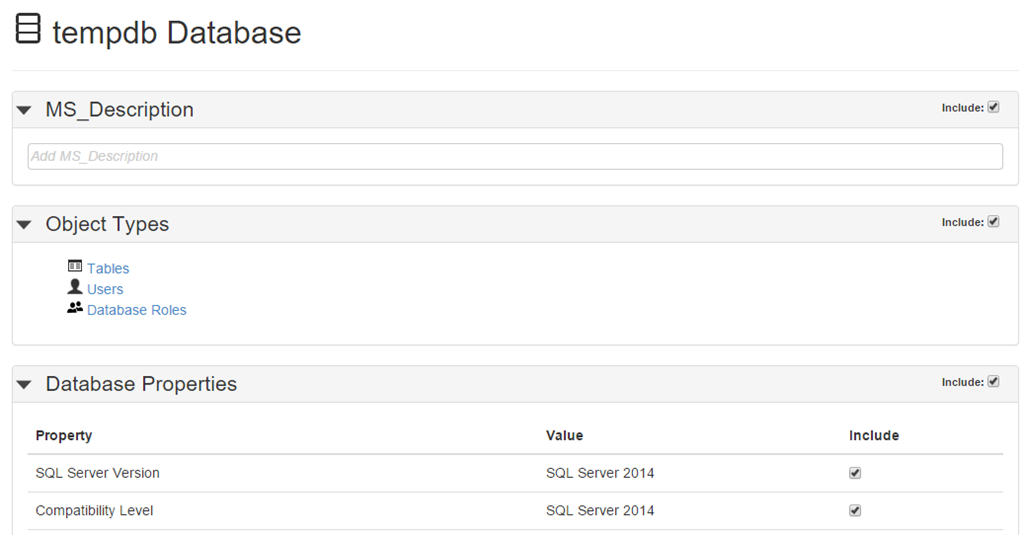
image

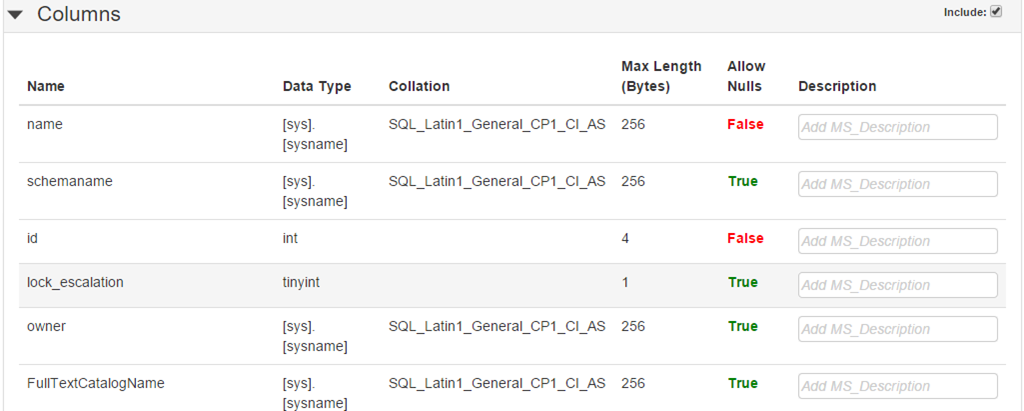
The screen capture will note that under Object Types you are able to drill into and get as granular as you can. The below example will show you a snippet from a table in the TempDB and will also show that you can enter a description of what the field is utilized for in the far right hand column under Description.

image

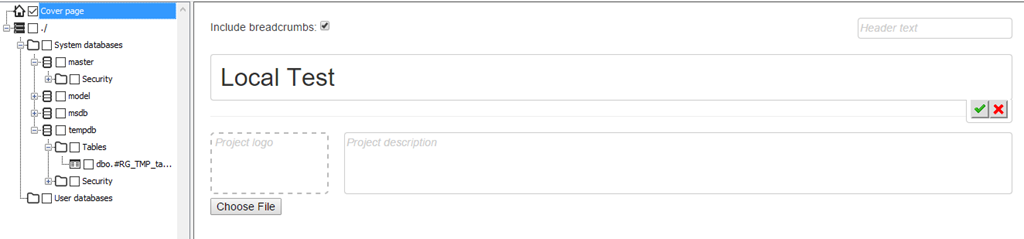
Step 4: If you have to save this documentation out for any meetings or other purposes you can create a cover letter along with any logo information and description. Simply click on the cover page option on the left menu and complete the following:

image

Step 5: After all the choices are made you can click on the General Documentation Go button on the menu and be prompted for the following:

image

image

Give the location and file a name and BOOM; you’re done.

Summary

You may find yourself in a situation where you are needing a quick hit for documentation purposes. If you are an avid RedGate user and enjoy using their SQL Doc product; or maybe you had this product and didn’t even know what it was then you can benefit greatly from documenting multiple databases in a matter of minutes. This post is to show you what type of utility SQL Doc is and what it can actually be used for in a real life circumstance. In the end it was the right product and right time to use it for a technical team in need. Well done RedGate, well done.

Why Use Red Gate’s SQL Multi Script?

Someone once told me at the shop that we have plenty of software utilities laying around that could be very useful that no one is utilizing. I got to thinking about that from a DBA standpoint; we are fortunate enough to have the Tool Belt from Red Gate and with that comes a plethora of utilities such as SQL Data Generator, SQL Document Manager, SQL Compare, SQL Data Compare, and the list could go on (full listing).

One of those said utilities is a little gem called SQL Multi Script. For me I have found this utility most useful. First of all I’m a heavy SQL Compare (why use SQL Compare) user. We utilize it here in the shop daily for the most part and I like the ease of how to call all of Red Gate’s apps from one location:

By clicking on the icon in top left you will be presented with a list of utilities in your tool belt (pending on your licenses and I’m using version 12.1)

RedGateIcon

As you can see the SQL Multi Script utility is the last on my drop down menu:

RedGateIcon2

The Why?

So, now that we’ve established how easy it is to call the utilities from any said location within the product line; exactly what does multi script mean for me? Glad you asked; I’m going to try to take you on a journey inside a utility while painting an example of how to use to tool in a real life example.

When you first come into the utility you will see a screen similar to the one below:

RedGateIcon3

What I like about the utility is the ease and flow of the product. It didn’t take long to get up and running with it. If you notice on the left hand side you have the option of adding existing or new scripts to the template. In my case for releases this allows us to save multiple schema changes for various databases and incorporate them into one setting for a quick review and execution. One thing that I have ran across, that is no fault to the utility, is static data scripts that may need to be run in a certain order, but that is up to me to put in the correct order of execution once I get the scripts into multi script. I will show an example below of what multiple scripts look like within the utility.

On the right hand side you will see  a distribution list. By clicking on configure you can set up a list of servers that you normally deploy or execute to in one location. One thing to keep in mind is to execute the scripts according to which server (databases) you select. Be cognizant of which ones you are selecting within the utility.

Example of adding existing scripts:

RedGateIcon4

Example of configuration set up:

RedGateIcon5

At the far right you can see I have a test distribution list set up. This affords me the ability to add servers from the list on the left or I can add any SQL server into my listing. From there I can pull down exact databases on that server to execute scripts against. For this purpose I’ll pick a couple of databases from the local server for review:

RedGateIcon6

I have two scripts I want to execute against two databases on my local. I can execute both scripts if I want at the same time or I can execute one script at a time. I also have the ability to select only one database I want to run the scripts against or I can select both databases to run the script against (think of syntax and proper use of database names if you go this route in the script). This is just flexible functionality in which the utility presents.

Back to my case at hand; since we deploy to multiple servers against multiple databases also think about the big picture. I can include databases from all over the enterprise environment if needed and let the Multi Script utility control when to run what, where, and in what order. If you look closely you will notice a blue arrow pointing down in the “Scripts to Execute” section. This arrow, along with the up error next to it, allows me to move my scripts up and down in the order I want to. So I can add all the scripts I want at one time and then come back through and organize them when I am ready.

The Results

Now, after the script execution is complete you can review the results in the lower window pane of the Multi Script utility. Will look similar to results window below:

MultiScriptResults

A feature I like is the ability to save multiple script executions in different formats on work that was completed; this comes in handy when supplying back a summary report of what was changed to a:

  • Change Management Team
  • QA Team
  • Dev Team

MultiScriptSaveResults

Said All That To Say This

There are various utilities available to us that we may not even have explored yet. This little utility by Red Gate has come in real handy for myself and my team. Take the time to look at what is available to you and see what may fit your needs. This concept does not just pertain to Red Gate utilities. Look at various things in your everyday routine and ask yourself:

  1. What can I utilize to become more efficient?
  2. Why am I not utilizing the utility?
  3. Is there a lack of knowledge?
  4. Where are my gaps that I can improve on and how do I get there?
  5. Is there a utility out there where I won’t have to reinvent the wheel?

Look for the hidden gems and continue to provide “Leadership Through Service”

PASS Summit Recap and Experience

IMG_20151027_142416The day finally came and I was fortunate, no I was blessed to be a part of the PASS Summit held out in Seattle, WA. This year would be my fourth year attending in five years. I did miss when it was held in Charlotte, go figure it was closer there to me. In any sense this year did not disappoint.

It’s almost hard to put into words the experience you get when attending, by that I mean the learning, sessions, people, community, and much more. I am always pleased to see all the first timer ribbons on badges as I remember when it was my first time attending the conference and the overwhelming factor you may feel. I try to make a point to seek out a few first timers and introduce myself, oddly enough I had a few actually say hey, your Chris this time around – very weird to me.

I doubt I can do it justice with a blog post, but nevertheless I will do my best to let you have a look into what kind of an experience can be had by attending such an event.

FreeCon

IMG_20151102_135407I started my journey a bit earlier due to being invited to Brent Ozar Unlimited (blog | twitter) FreeCon put on by Brent Ozar (twitter), Kendra Little (twitter), and The Doug Lane (twitter). A full day of learning on a wide range of topics got the week off started on the right foot. I’ve had the opportunity to speak to Brent in the past; this year I had the pleasure of getting to know Kendra and Doug a little. All three are some phenomenal and stellar individuals who truly care about the community.

One thing that stuck out to me was the authenticity shown by both Brent, Kendra, and Doug along with the 50 or so of us who were asking questions. It was very nice to hear real world issues from other colleagues and walking through thought processes. Very captivating.

Some of my cohorts in crime from the community from Mike Fal (blog | twitter), Mala Mahadevan (blog | twitter), Gareth Swanepoel (blog | twitter), Mike Hillwig (blog | twitter), and Vicky Harp (blog | twitter). The event was truly an awesome experience and one that I am not taking for granted. I walked away from it with a ton of notes and things to implement in my own career!

Live Blogging

IMG_20151029_075507Interesting enough I found myself at the Live Blogging table for some events this year. I was able to cover the two Key Note addresses on consecutive days right after breakfast, and let me tell you this was one of the highlights to my week. I’ve attended the Key Notes in previous years; however picking up key pieces was essential along with having a good plug-in to the blog for doing live blogging. I did some homework prior to and talked to a few individuals who had done live blogging before at the event just so I could prepare a little. Being able to capture events such as Dr. Dewitt and Rimma Nehme (twitter) talking about their last Key Note at PASS Summit was something that sent chills through me.

It was truly and honor and privilege to be a part of the event with so many people I have looked up to in my brief time in the community – Tim Mitchell (blog | twitter), Allen White (blog | twitter), Jes Borland (blog | twitter), Erin Stellato (blog | twitter), and many more.

The People

IMG_20151028_080141This is definitely one that I could spend a whole topic on from community zone, to side bar meetings, to talks with vendors, and the list could go on. I will say that I spent a majority of time having face to face meaningful conversations with peers, vendors, and colleagues. I cannot list them all here nor would I attempt to; many of you took the time to come up to me – even individuals who I did not know or met before and I appreciate that. I wish I could have spoken to more individuals, but if you ever see me around feel free to reach out.

Community Zone and Community Wall

IMG_20151027_122501This was some time well spent where you could meet friends, peers, other data professionals from all walks of life. I was first enamored by this last year in 2014; it’s a cool place to hang out or just detox from what you have learned. Many insightful conversations happen here; not just from work load or issue perspective, but ideas on what others are experiencing and doing as well. If you have not taken advantage of the opportunity to speak to some of the community members I strongly urge you to if you make it back. Community is a big aspect of the PASS Summit and you will not be sorry for taking advantage of such

The Sponsors

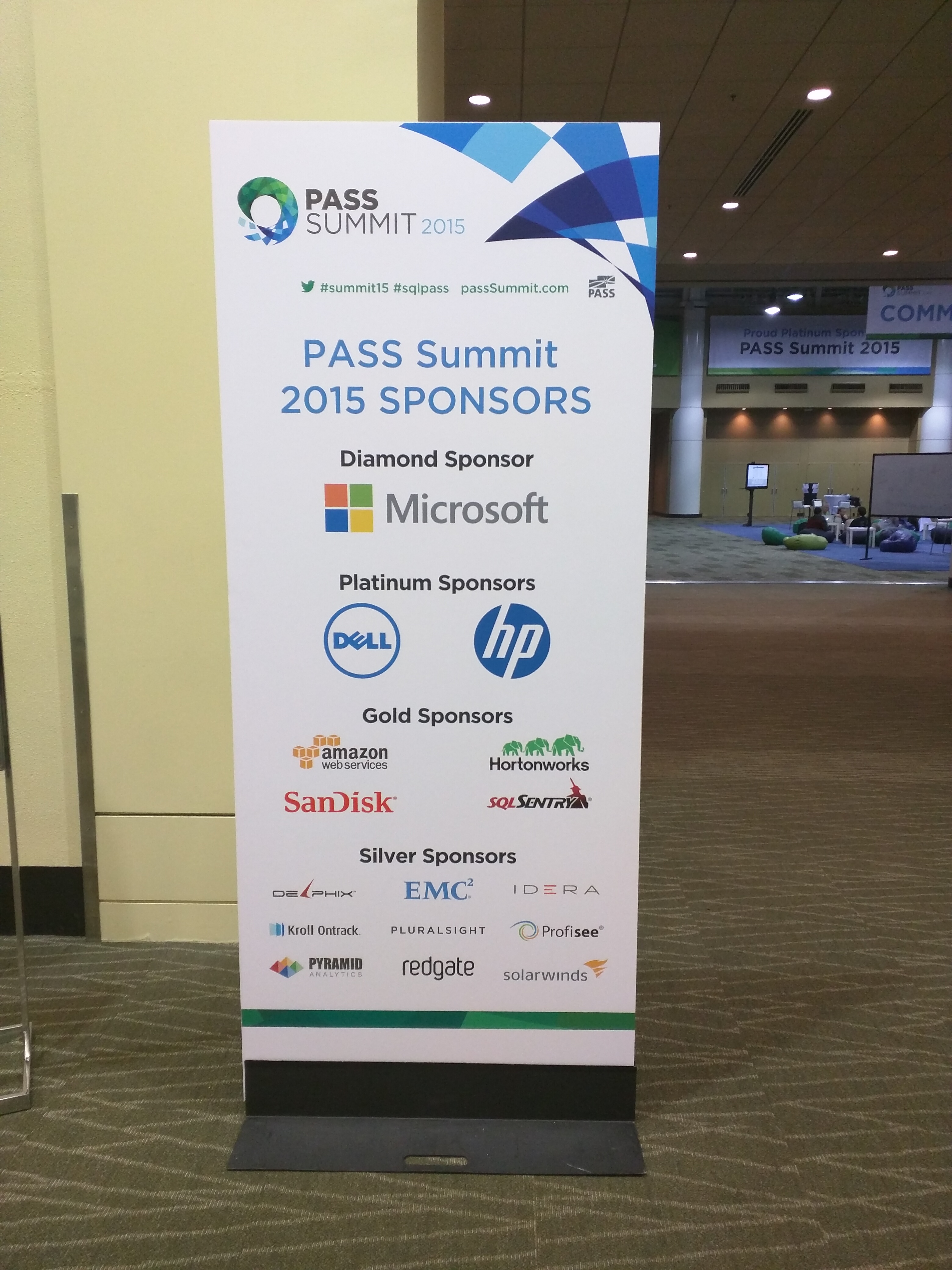
IMG_20151028_180828One of the big reasons we can do what we do are the sponsors, volunteers, and tireless countless numbers of workers who put in hours, money, and sweat into pulling an event off for 5k-6k individuals. A huge thank you goes out to them for their hard work and effort.

I did like the fact, not sure how many others feel this way, that PASS Summit recognized the sponsors where people could see as they walked back and forth to the community zone, breakfast and lunch area, and vendor area. It allowed me to take a quick snapshot of the pic to the left.

If you haven’t had time yet, some of you may even be customers. Shoot them a thank you note; they do appreciate it.

For me specifically a big thanks to Red-Gate, SQL Sentry, PureStorage, and Linchpin People.

Argenis Without Borders

IMG_20151029_125707This year alone this initiative brought in over 22k dollars. Argenis Fernandez (blog | twitter) and Kirsten Benzel (twitter) started this a few years back; now some of you maybe have wondered why people were all dressed up for in the middle of the community zone; well certain targets needed to be hit for certain, shall we say, fun to take place. Not to many places you can see people dressing up and Mike Fal playing a trombone. Heck they even through in some individuals getting tattoos since record numbers were broken.

In all seriousness this is for a great cause put on by some great people. If you haven’t had the opportunity to be a part of it take a look here; every little bit helps.

Highlights

There were a ton of highlights for me. Conversations that were had along with meeting some new people along the way such as Warwick Rudd (blog | twitter), Ben McNamara (twitter), Karla Landrum (twitter), Alex Yates (blog | twitter) to name a few made my day and getting time to spend with a lot of my friends made for a good week.

I am pleased to say that I will begin helping with the HADR Virtual Chapter in the very near future. More to come on that in future posts, but am thankful that John Sterrett (blog | twitter) and David Klee (blog |twitter) are taking a chance and investing some time in me.

Sessions were strong this year. I got to see a few from my good friend John Morehouse (blog | twitter), Mike Fal’s awesome session on PowerShell, to the outstanding session Erin Stellato gave on XE. If you missed any make sure to visit the PASS Summit website and purchase the sessions; you won’t be disappointed and it is an investment for your company.

Closing

Being part of the PASS Community is something that has changed my career. I’m living proof that what we do on a daily basis works and is working. If each one reaches one then our mission is complete ~ I’m thankful yet humbled to be on this journey.

It’s always a pleasure to see everyone at PASS Summit and look forward to many more conversations, collaborations, speaking engagements, and demos. Let’s keep moving this community forward one day at a time and keep investing time in others. What you do today influences someone else tomorrow – Let’s Roll!

IMG_20151027_151532