Tag Archives: SQLServer

Alerts – Who Knew?

CollaborateImageThis week I am back at it with my SQLCoOp friends in sharing something new that we’ve learned since our last post. You ready? Great, pull up a chair and let’s see where this takes us shall we?

Wait a second…….do you hear that……..no, listen closer…….ALERT ALERT ALERT! Sirens seem to be going off all around and somehow we found ourselves in all hands on deck mode. Have you ever been there before? Chances are if you have worked in technology at all this has happened to you at one point in your career. If it hasn’t then eventually it will; trust me.

How do you handle such scenarios when they do come up? Reporting of alerts off your systems or applications can be very useful and while there are many ways to accomplish this I was introduced to an SSIS method I had to deploy this week. It made me dive in a little deeper and look into how the methodology behind it. If we break it down; it can be done so my analyzing 4 steps within the package.

Main Package:

SSISAlert

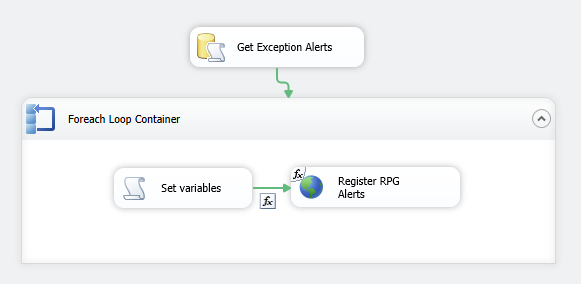
The main package will consist of a database call, a for each loop container, setting of a variables task, then a wsdl (windows service) by utilizing an expression. The intent of this post is to show how you can make these calls happen and not to go into depth of what is located within the procedures or wsdl file; that shall be something for another today or better yet this should set a foundation in place for additional research one can do…..thus the learning something new part.

Getting the Exceptions

The Get Exceptions Alert utilized a simple SQL Task editor; once you create this editor you will notice the below screen shot. To complete the set up simply fill in the name and description. The next two important properties are the most important of them all. The connection and the SQL Statement. The connection is simply the database to which you are making the connection to; the second is executing a stored procedure that will gather all the alerts by the application that need to be emailed out.

SQLTaskEditor

For Each Container

You remember the SQL Task Editor we set up in the first step; this next step is what takes that result set; loops through the iterations and gets a collection of the alerts to be sent. Part of the homework is setting up the return result set in the SQL Task Editor. Once that is complete then you set the result set in the ADO Object Source variable noted below; this will allow multiple iterations to flow through. In this case the selection of enumeration mode should be set to rows in the first table

ForEachContainer

Set Variables

One of the key components are the variables to which you will utilize. These may be different depending on the in depth alerting that is wanting to be accomplished but for simplicity sake I will list out what the one I ran across was utilizing. We will notice that we have seven variables that will be set.

  • Alert – the alert name
  • Alert Info – what is so fascinating about this alert
  • Alert Type ID – correlates back to the type of alert that was set off
  • Result – the result of the alert
  • Result Data Set – the data that caused the alert and in this case not used
  • Source Process – what process triggered the alert
  • Source System – what system did this come from

SettingVariables

Registering the Alerts

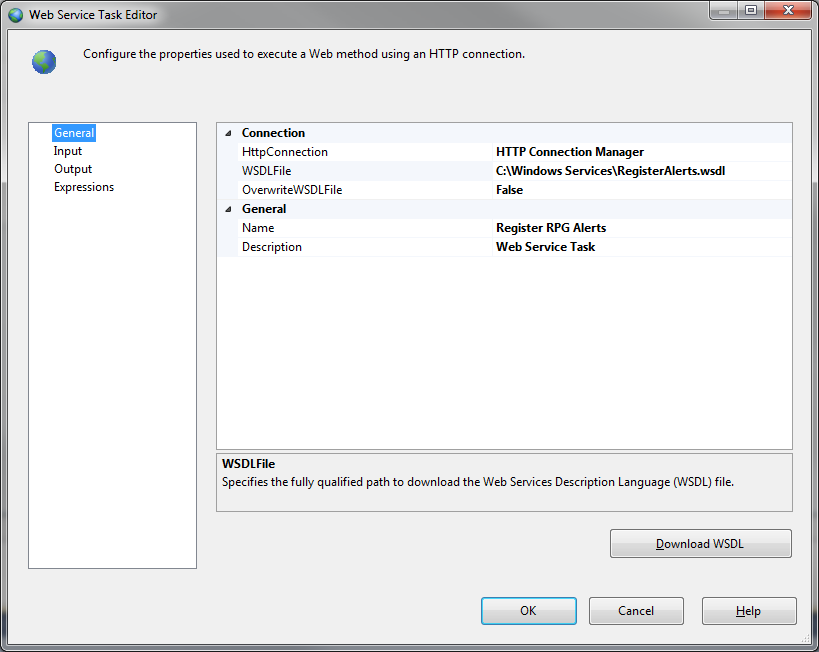
Registering the alert and sending the email notification is the last step to the puzzle. This is done by utilizing the windows task service editor within SSIS. As you can see I have a wsdl file located on my local drive in a directory called Windows Services. As I mentioned before, I will not be going into detail of the contents of the wsdl file; simply know that it will trigger the email notification. The result parameter will be fired off to a group of individuals to review on a time based period. That parameter value will be supplied in the output section of the Web Service Task editor.

RegisterAlerts

Conclusion

There are several ways to arrive at this same goal and I found this one to be unique and one that is not traveled often. The package can be set up to be executed by the Agent on a time based interval. Whatever the case may be and whatever method that you do choose the important part is to keep learning.

I tell you what; check out what my other colleagues have to say on something they learned recently:

On a SQL Collaboration Quest

Four SQL professionals gathered from the four corners of the world to share their SQL knowledge with each other and with their readers: Mickey Stuewe from California, USA, Chris Yates from Kentucky, USA, Julie Koesmarno from Canberra, Australia, and Jeffrey Verheul from Rotterdam, The Netherlands. They invite you to join them on their quest as they ask each other questions and seek out the answers in this collaborative blog series. Along the way, they will also include other SQL professionals to join in the collaboration.

Trumpet Sounds; Call To Post

ChurchillThis past weekend was the KY Derby. All eyes are on this one day of horse racing; celebrities come in to town in what seems to be a whirlwind two days. According to experts over 100 million dollars is pumped into the local economy.

I get to see all the hoopla firsthand, and throughout the week can walk down the street from the shop and see no telling who walking down the street on their way to the limos, Escalade’s, and the such.

The Race

Then comes the day of the race. The big race where people go to the track spend the day, and then in the evening for 2 minutes, which has been deemed by others as the most exciting 2 minutes in sports, the horses are loaded in and off they go. Some 160k people cheering in the stands and millions of dollars are at stake.

The horses start off in a pack going into turn 1,2, and 3. Jockey’s maneuver their way in the field to position themselves for that final stretch. Turn 4 and horses are in their stride; jockeys kick it into gear and now an all out sprint ensues. Sometimes there is a dead heat; sometimes there is a huge gap, but nonetheless it is a mad dash to the finish.

The DBA Race

As I went throughout the week leading up to the Derby my mind kept wondering to how closely it reminded me of the life of a Data Professional. Being a Data Professional means that you will be in the same space and many other fellow Data Professionals and if you pay attention closely all jockeying for that last leg to the finish line. I’ve kind of stepped back and started looking at how I was running the race.

If you go at an all out sprint in turns 1,2,3 would you really have anything left on turn 4 in the home stretch?

What if you laid back in the field and waited for the opportune time but come to find out you waited to long and the bottleneck wouldn’t give you a clear shot at the end goal?

Or you could be like the one jockey I saw get thrown from their horse during the race.

I’m finding that being a Data Professional and, to be more exact, being a DBA my journey can be at times related to a race. I remember when I first started out how excited you become; just like starting out of the gate. Then, as you go through your journey and you see some of the Data Professionals that you started out with start to fade. Whether they get burned out, choose a different career, move on, or whatever the case may be the numbers start to drop then it is another cycle where new faces come in.

The Call To Post

The trumpeter starts the call and in walk the Data Professionals, as we get ready to prepare to run our race don’t settle for the being average. What are some of the ways when you start out of the gate as a DBA you can do to prepare yourself  for the journey? I’m not sure there is any one right answer but I can share with you what has helped me along the way. It’s not rocket science and it is not something that you can snap your fingers and it be done. If this helps just one aspiring DBA then so be it; it would be worth it.

  • Community – I was late to this game and had I become more involved with the community earlier on in my career I believe it would have helped me more. I’ve already elaborated on my “Fab Five” and if you haven’t read that yet check it out. For me I looked for people in my industry who were at the top of their game and who I knew were what I considered the best of the best. Learning from others in the community is a huge positive and one can garner much knowledge from others if we would do just two things – be still and listen.
  • Initiative – how bad do you want it? If you are expecting someone to hand you success and you are a data professional then you are in the wrong business. Early on in life I was taught discipline and a hard work ethic. If you want it that’s fine; go after it and prove to yourself that you can do it.  One quote I always remember being told to me is that “Somewhere someone is practicing getting better at the skill and goals you want to achieve; how bad do you want it?”
  • The Craft – learn it; live it; breath it. If you are a DBA like myself then what are some of the things that you can do to enhance your shop? Perhaps it is implementing a maintenance strategy around index fragmentation, or is it disaster recovery? Have you restored that backup yet, do you know if you were asked for a restore from 3 days ago could you do it? How about exploring the Plan Cache and getting a feel for how your stored procedures are acting? Oh wait do you know if you have any missing indexes present in your current environment? Speaking of environment have you documented your environments yet? So much work to be done in this are that a paragraph in a blog post doesn’t do it justice.
  • Ask Questions – have you ever been in a session or speaking with a group of people and you wanted to ask a question but didn’t because you thought it would make you appear to not know what you are talking about. Guess what, we’ve all been there. The end of the day every question is valid. If you don’t know then say you don’t know; research and find the answer that is called learning. The challenge is to continually learn; go back up to my Community point. My “Fab-Five” are ones that continually learn and hone their craft and skill set.
  • Don’t be afraid to make mistakes – now don’t take this point and execute something in production that causes your company an outage and money. No that’s not what I’m saying. Think outside the box; test new alternatives and do so in a manner that meets your shops integrity and criteria with environments.  Why wait for someone else to come to a solution; everyone can bring something to the table.

The Roses

Every horse that wins the Derby is dawned with roses over their mane. Guys I don’t know when my race will end, but when that time comes I want people to realize that I gave it my all with integrity, character, honesty, and in a trustworthy manner. I want that developer to be able to come to me and not worry about me chewing his head off (yes that has happened before), or the network guy who can come talk to me about space concerns, heck why not throw in the business unit requesting some help with architect something out. No we (DBAs) aren’t perfect and days will come where we flat out fubarb and make a mess out of it, but guess what? How did you run the race?

Rest assured we’ll get to the finish line one day. Let’s have some fun along the way and realize that we won’t be perfect everyday, run a steady race, and continue to work hard day in and day out. For it is in the face of adversity when true character will shine through.

For those just starting out check out the advice in a collaboration John Sansom made happen that I was honored to be a part of. For those that have been around keep working hard. Hard work will pay off; keep fighting the good fight.

RedGate SQL Search Has What????

CollaborateImageThis week I am back at it with my SQLCoOp friends in sharing the goodness of a utility that has helped us all ~ RedGate’s SQL Search plug in for SSMS.  This utility has always been helpful in perusing through the schema of any SQL architecture in the search for the gems that we as data professional look for.

The Quest

The outlook was grim and bleak recently one day at the shop. I could recall a portion of a job name and step name for that matter but couldn’t find it for the life of me. The server I was on at the time had a vast amount of jobs on it which I will save for another day.

I will admit frustration started to set in and I started to just open up a query analyzer and start writing some code then it dawned on me…..I had just downloaded a new version of RedGate’s SQL Search Utility. I recalled from the version that they extended the search into SQL jobs; at that moment it was like a light bulb went off in the old noggin.

Now, if we are honest, we all like to work smarter not harder and save time along the way; with that said I decided just to crack this utility open and give it a shot.

Let’s Go

First thing I needed to do was fire up SQL Search inside SSMS. To do this and for the sake of explaining I will be showing this use case on my local, because well, we shouldn’t be showing the world our prod servers now should we! As you can see below firing up SQL Search is simple an easy. While on my local instance if I click on the SQL Search highlighted icon it will bring me to my SQL Search screen where I can then expound on my search criteria.

FiringUp

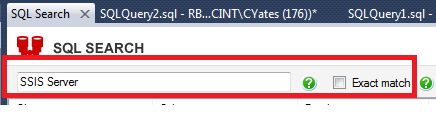
I had to define my search; I knew a phrase in my job but didn’t know the whole name….so with that said typing in what I knew and not selecting the exact match I knew would pull back the full job name; or so I thought.


Phrase

Now this is where it gets really good and makes the SQL Professor very happy. RedGate decided to go on and throw job search functionality into their updated utility. If you click on the All Object Type drop down you will see a Server Object called jobs. Simply go ahead and check that. Now for my use case I went on ahead and checked them all.

Jobs

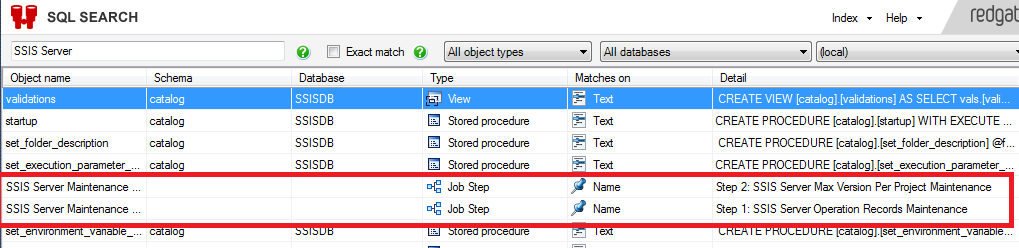
So, what have we done up to this point is type in our phrase, ensure the jobs server object is check then it’s giddy up and go time. After letting the search occur in all databases I find the results I’m looking for:

JobResults

My job name pulled back along with the actual step detail. Whoa wait, I had no clue I’d get the detail with it as well. Hats off RedGate this is something that every Data Professional can utilize and is a tool that saves time. It took me less than a minute to do a quick search and pull the information that I required.

Like What You See?

Listen, this just is one avenue in which RedGate has enhanced this product. I’m an everyday Data Professional that goes into work everyday and wants to work efficiently. Check this product out for yourself here

Some of the other enhancements made are:

  • Search in jobs
  • Select multiple object types and databases to search in
  • Improved indexing
  • Search with % wildcards
  • Search with Boolean operators

I tell you what; check out what my other colleagues have to say on the matter and how they have benefited from this utility:

If you want to read more about the newly released SQL Search, don’t forget to check out these blog posts:


On a SQL Collaboration Quest

Four SQL professionals gathered from the four corners of the world to share their SQL knowledge with each other and with their readers: Mickey Stuewe from California, USA, Chris Yates from Kentucky, USA, Julie Koesmarno from Canberra, Australia, and Jeffrey Verheul from Rotterdam, The Netherlands. They invite you to join them on their quest as they ask each other questions and seek out the answers in this collaborative blog series. Along the way, they will also include other SQL professionals to join in the collaboration.

Communication – is it key?

Communication2Communication is easier now than it has ever been. Whenever we need to get in touch with somebody, we can call, e-mail, or text, regardless of where we are and where they are. Geography isn’t an issue; we can instantly send a message to somebody halfway around the world. Some people even text each other while they are in the same house – just because they don’t want to get up and go to another room. Without much effort, we are almost always “connected” if we want to be.

But have you thought about what we may be losing when we depend more on electronic contact and less on face-to-face communication? When we’re with others, we understand them much better. We can read facial expressions, pick up on emotional responses, and communicate our own feelings very clearly. The results is more interaction, more depth, and more substance.

The communication tools available to us today are wonderful. It’s great to be able to get in touch with people anywhere, anytime, and I wouldn’t want to go back to being unable to contact someone easily when I’m out of town or need a quick response on an urgent matter. I like being able to keep in touch with my family regardless of where they are. But when we start to depend on technology as a substitute for one-one-one time with each other, we are missing an important key to relationships. In forming virtual bonds, we may be forsaking the benefits of true human interaction. We need to make sure we are not so connected with everything out there that we miss the chance to connect with the people directly in front of us. Being connected means thinking of others and reaching out. Make that happen as often as you can.

Each person, and or leader, is different and has different methodologies and view points. One of the key components or attributes I have found in leadership is communication and having an open communication with other team members and business units. When was the last time you had effective communication in a meeting? When was the last time you had effective communication about an idea with a team member? Let’s take it a step further, when was the last time you had an open dialogue with your team? Building confidence and building a team takes a strong and discipline element composed of communication.

Don’t settle for the status quo; become an exceptional leader and/or an exceptional Data Professional. Be the game changer and motivator your team needs today.

Get After It

SuccessI was over at John Sansom’s Forum (Blog | Twitter) this week and it was refreshing to see some posts of Data Professionals eager and excited to learn new things and setting their sights on some personal goals for themselves.

It actually motivated me to think about where I came from, where I’m at, and where I want to go. Beyond that though it triggered something in my mind that in reflecting I kept noticing, like the post from the forum I mentioned above, I have been approached many times over about the life I live as a DBA and my daily activities.

How Bad Do You Want It

Let me ask  you something, how bad do you want it? The life of a DBA is not always a bed of roses; it takes hard work on a continual daily basis with continual honing of skill sets, knowledge, and dedication. Don’t get me wrong, rewards obtained are great but nothing is handed to you in life.

The persona of the DBA being perfect is just that, a persona. We all make mistakes but here is the catch. The good or extraordinary DBA’s admit and learn from those mistakes and build on their knowledge base from those mistakes.

Example: Business comes looking for a backup and when you look you notice that your backup process has been failing and no alerts have been set up.

Seems pretty simple right? DBA 101 material however I have seen this happen. Now do you blame someone, step up fix it and take the blame, or start looking for another job? Here’s the thing that keeps coming back to my mind – every day we have choices and how we handle issues. How do you go about handling those issues?

Being A Complete DBA

Is there such a thing? Different views and opinions. I’ve been fortunate and blessed to be involved with SQL for over 12 years now and one thing has held true. I learn something new every day. Whether it is from own experiences, webinars, training, it seems to always be evolving and that is why I enjoy being a data professional so much.

It has been defined to me growing up that attitude is what you or I feel or think about something or someone. What is your attitude toward your career? Do you view your role as a Data Professional one that is defined as a service? In writing this I was reminded of an article Grant Fritchey (Blog | Twitter) wrote back in August of 2013 Database Administration as a Service. It’s a great article well thought out; one of the major things I took away from this article was the call to action.

With Being a Data Professional Comes Great Responsibility

Let’s face it; if you are a data professional than you are entrusted with a great deal of responsibility. If you don’t think that is true just look at the latest security breach in the news. Companies look to you for advice, ensure systems are up and running, data is available when needed, what to do in an event of a disaster, security, security (did I say that twice??)

My own personal opinions of “some” characteristics of a DBA are:

Integrity

Punctual

Thorough

Character

Teacher

Communicator

Able to see big picture

Trustworthy

Willingness to learn

This is just a few characteristics that stick out for me. There are plenty more, I have not even scratched the surface. You can see where I am going here, a data professional is a unique individual, where’s many hats at times.

Am I a master in all the areas of being a DBA, no and guess what that’s okay. I come from a background where I firmly believe I can always learn something new. Early on in my career I remember Brent Ozar (Blog | Twitter) mention that he picked up something new. If guys that I look up to in the industry are continuously learning then I should never be in a place to say – I have arrived…no, my friends, that will never happen.

Leadership Through Service

I cannot do justice to what I stated Grant shared in his article; however it is an important topic to address in its own section. Even in my own shop, being part of a corporation I still believe this holds true. DBA Teams provide a service to the company. When I first started out as a DBA, I like many others have had, I had a developers background. I immediately saw a gap and that will always be there to some extent. Guess what though, DBA’s can coexist with developers. DBA’s can also co-exist with QA teams, and Infrastructure Support teams, and business units. Tear down the walls that have been built up; in the end whether you are in a shop or out on your own the work being done is for the betterment of a team. If the team doesn’t do well then guess what, well you know what happens.

SQL Professors Call To Action

I ask again, how bad do you want it? If you have been wanting to learn more about the ring buffer what steps are you taking to get there? If you don’t have a DR plan in place on core boxes what is your actionable item? If you have poor performing stored procedures what are you doing to fix them? Oh that index that is missing, have you tied it together to the source of a problem and verified that you really need it? Maybe your replication is broke, in that case find a big wrench. Whatever the task at hand may be how bad do you want it?

Are you stuck in a rut? Are you satisfied with status quo? I’m biased but I believe that we have one of the best jobs in the world; we should have some fun along the way and learn something everyday; while remembering that we are not perfect. Mistakes will happen; pick yourself up, dust off the scrapes and move on.

The SQL Family

It has been said over time that if you are involved with SQL you are part of a family, time and time again I’ve seen this as a close knit group of individuals who, when we see someone fall, dive in to help pick them up. If you aren’t involved; guess what – IT’S TIME.

Closing

It’s never to late to start learning, getting involved, or getting back into the game. Just like this community is ours, our professional development is ours. You have the ability to mold and shape your career. Seize that opportunity with confidence and humbleness. Be bold but courteous. Every data professional can bring something to the table – HOW BAD DO YOU WANT IT?

*credit photo to Phil Mickinney

Headache + Pain <> Red Gates SQL Search

Recently, I started diving into my utility belt. There are tools that I’ve had at my disposal for some time, some that I have tried and not gone back to, and ones that I use everyday. This has a definite potential to start exploring these utilities over the next couple of months and one that I touched on last few weeks that I want to expound a bit more on today is Red Gates SQL Search utility.

I’ve come accustomed to this utility as being my quick hit Sherlock Holmes style of investigating all sorts of issues that a common data professional may encounter throughout the work day.

The Utility

SQL Search is a “free” tool that is an SSMS add-in that pretty much allows you to scan across all databases for a plethora of information for all objects. How do you access this utility?

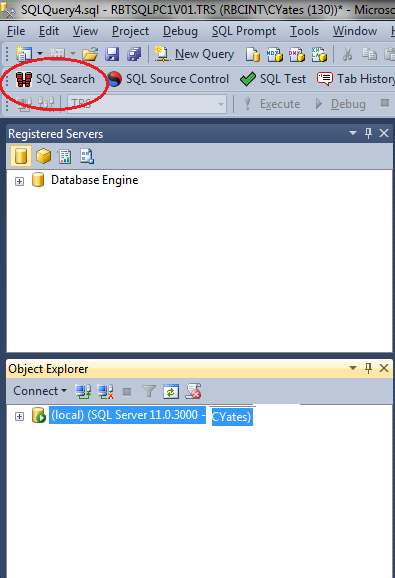
Once downloaded and installed within SSMS you will find it on your tool bar as indicated below:

SQLSearch1

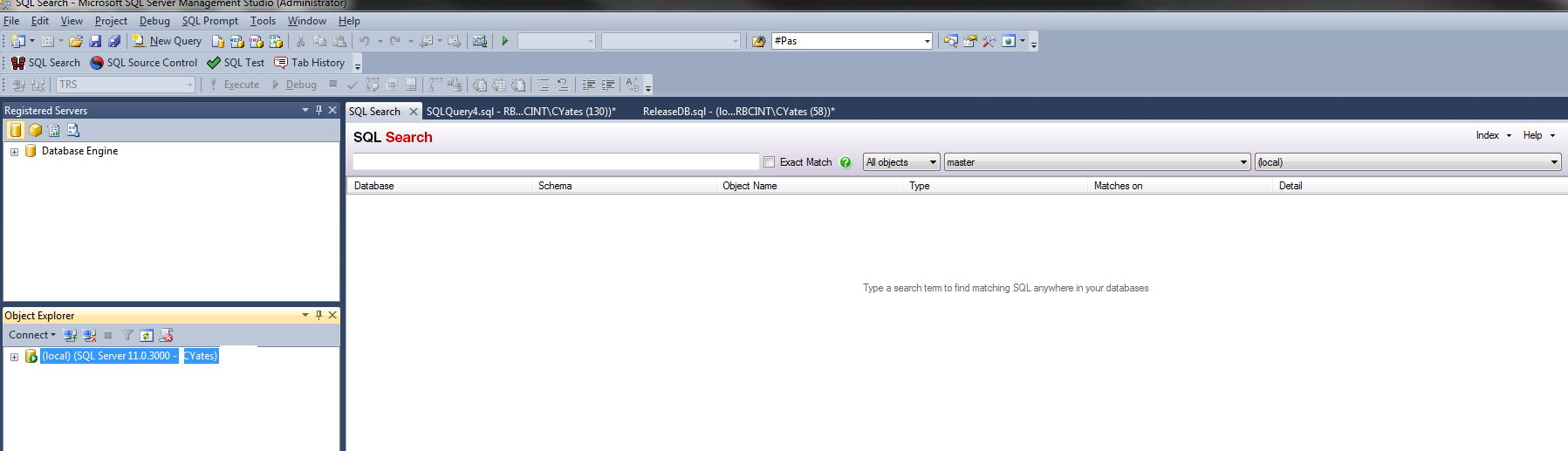
By clicking on the SQL Search icon or by utilizing the hot key of (CTL+ALT+D) you will open the SQL Search Tab in your current listed session below:

SQLSearch2

The Search Begins

Once you have this open I’d like to point out a few items.

  1. In the last image shown you will notice that in my Object Explorer I have my (local) instance selected and highlighted. If I had multiple instances in my Object Explorer SQL Search would open the tab on whichever instance I had highlighted.
  2. I can now begin my search. I have multiple options at my disposal on what I can check for and I can set limitations or filters if you will by selecting what type of object I’d like to filter on as noted below:
  3. The last two options are self explanatory with what database you are searching in, but I do want to point out the last option where I have (local) in my drop down. Currently, I do not have a second instance fired up in my Object Explorer; if I did then you could click this drop down and hop over to the other instance. This feature is offers nice compatibility when you have to work with multiple instances at once time.

SQLSearch3

By Jove Watson We’ve Found It

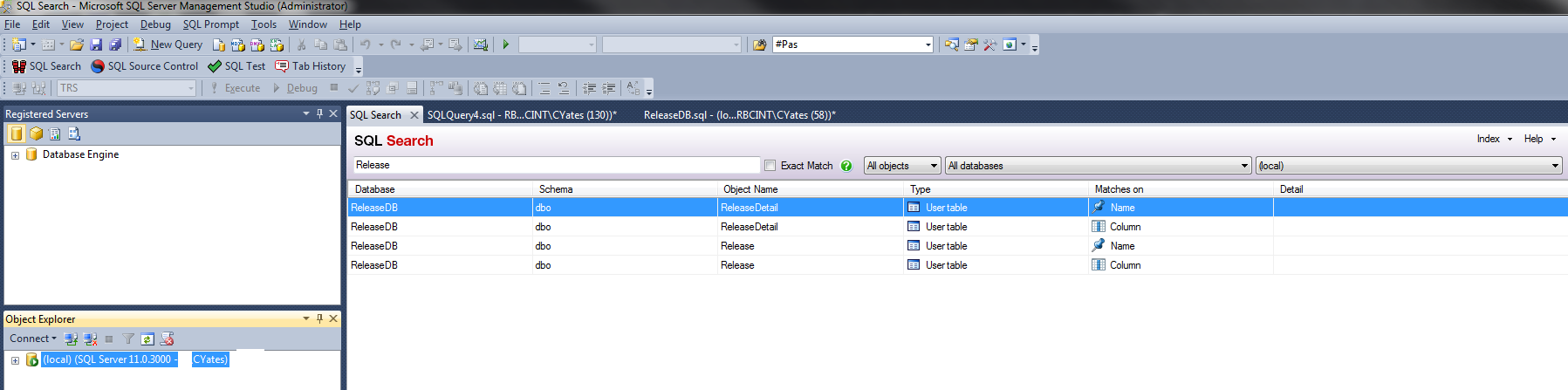
Now here is where the magic begins. For example, I know that I have a table called Release but I cannot remember where I saw it at, or maybe you’ve been in a meeting before and you leave with schema names but you’ve never seen the lay of the land before. Well here you go; if I type in the term Release and set it for all objects, scanning all databases my results are below:

SQLSearch4

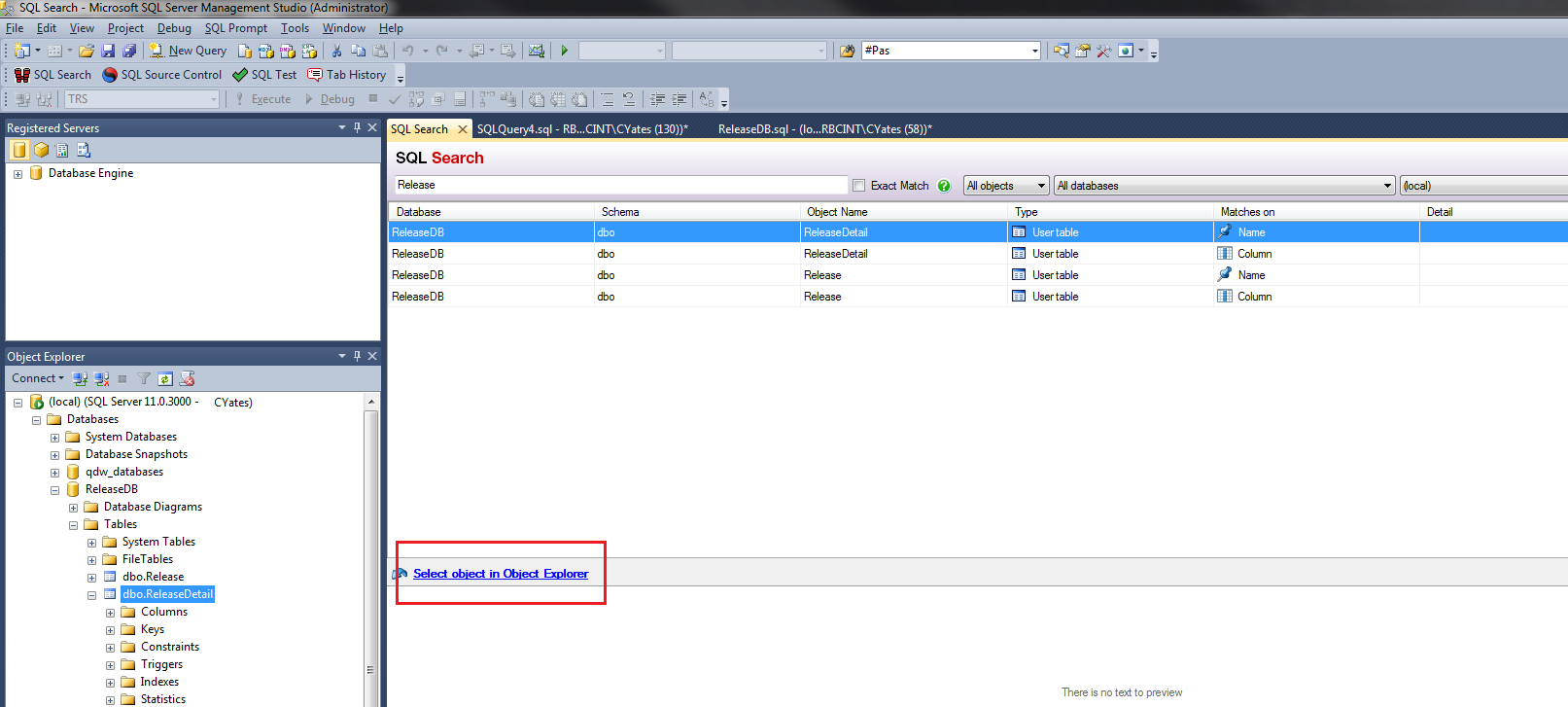
…but it gets better. If you look at the link that says “Select object in Object Explorer” it will take you directly to the location inside the DB where the object is located for review

SQLSearch5

Fancy but now what?

SQL’s version of Scotland Yard says this is all well and good but can it do more? Let’s step back and think about this a moment. The whole goal, with any business I hope, is to make processes and procedures more efficient. This utility makes a strong case for the data professional to add this to their arsenal. Here are some real examples on what I utilize this tool for that haven’t been mentioned thus far:

  • Off and on code reviews are done. Have you ever ran across the infamous /* TO DO */ comment? Heck I’ve put those comments in before in my own sp’s noting I need to finish something at a later time. I can quickly scan a DB and easily find these gaps in seconds
  • Select *; don’t fool yourself. While these are frowned upon they are still used. Utilizing this tool has helped me pin point such code in seconds which then proceeds my conversation with the author of the code or update
  • I’ve utilized this utility as my central hub for branching out when I know parts of names to objects. Gives me quick insights into the schematics of the database and what dependencies objects have prior to making any changes
  • Efficiency – this one word carries so much weight. I wish I had this utility when I was first starting out; for me this product is definitely a game changer and did I mention it is free? Why not take advantage of it > go check it out now you know you need it in your data professional tool belt

Are You Using SQL Search Already?

If you already are utilizing this utility then drop Red Gate a line and let them know what your thoughts are on the subject; Red Gate always enjoys getting feedback and I have never seen a more thorough company in taking use cases and every day occurances by the user and figuring out how they can make their products better.

Contact Red Gate

More utilities from Red Gate

If you like what you’ve seen thus far; than you haven’t seen anything yet. This will become a mini series I’m proud to work on with some other individuals that are part of the Red Gate family. To see their twist please check out:

Julie – SQL Tools Review: SQL Search
Mickey – On a SQL Quest Using SQL Search by Red Gate
Jeffrey – How SQL Search saves you time

T-SQL Tuesday #051: Place Your Bets

SQL-Tuesday.jpgThis months T-SQL Tuesday block party is coming from the renowned Jason Brimhall (blog|twitter). You see each month a SQL Community member hosts this block party and this months theme is “Place Your Bets”.

So you want to gamble? Come on up to the SQL table and place your bets. Any Data Professional is welcome – junior level up to senior level all money is acceptable at the SQL table.

Okay, I’m in what are we betting on today. Well, you are in luck my friend today’s bet is on backups; sounds simple enough doesn’t it? Sure that sounds like fun I’m all in, well wait what about backups?

You’re lucky you asked, otherwise you’d be called a sucker and I’d just would have taken the all in to the house “Little Joe”.

The Scenario

It was a dark grey morning…oh wait that’s a different story. Let’s say you have a plethora of databases that are all business critical and you have automated tasks that backup these databases. If something happens while in the backup process and the process fails than a failure notification is sent out notifying the advantageous Data Professional that their process had failed and go take a look so you can fix it. All is well, right?  Most would say yes, some would say no, and then there is some, the gambler, who says who the heck cares. You have the backup process in place ~ Let’s Roll.

The Gamble

I bet on that scenario early on in my career. I went all in with the house and you know what, that didn’t pan out to well for me. Why you ask, well gambling on whether or not my backups were solid and good opened my eyes to something that I knew but didn’t really take into consideration in the beginning stages of my career. I had a critical database being backed up…phone rings. The proud DBA picks the phone up…yes we have an issue and we need to look at our backup for x date. Sure thing, I got it right here. I’ll restore it and we’ll take a look at it.

Go to restore and the backup is corrupt; initially I’m thinking well that isn’t good. It was then when I had to go back and tell the business that the backup was corrupt and I would need to go a day before or after to get the information – but wait Mr. Gambler what about T-Logs did you have those – um nope business deemed it not necessary and didn’t want to pay for space etc for the growth needed.

Conclusion

Even after taken precautions in my backups I still feel the strong need to ensure testing of the backups is being done whether it is through an automated process, spot checking, etc. Taking a backup is great, can that backup be restored? Are the settings on the backup set properly? If you can’t answer some or all of these then take time today to do some checking.

Each shop is different and will have it’s hurdles to climb. With that said are you all in? Do you want to take that gamble and bet against house? Business looks at backups as a safety net or in some cases really doesn’t care as long as you have them. To the Data Professional they are much more.

I’ve always been taught to work hard and hone your skill set; for me backups fall right into that line of thinking. Always keep improving, learn from your mistakes. From mistakes comes growth and don’t be afraid to fail. Many successes have come from failures or setbacks.

What is T-SQL Tuesday

T-SQL Tuesday is a monthly blog party hosted by a different blogger each month. This blog party was started by Adam Machanic (blog|twitter). You can take part by posting your own participating post that fits the topic of the month and follows the requirements below. Additionally, if you are interested in hosting a future T-SQL Tuesday, contact Adam Machanic on his blog.

Utilizing PowerShell With 2012 SSIS Deploys

toolsThis venture was first inspired by watching and reading Steve Jones’ (Blog|Twitter) PowerShell challenge. I always knew that PowerShell was a powerful tool and one that I needed to jump into at some point in my career. I dabbled with it some last year and did some small things, but it became more evident heading into this year that I needed to get more accustomed to all the intricacies and the usefulness I could gain from it as a data professional.

One major paint point in automation portion of deploys was the fact of deploying .ispacs in SSIS 2012. Now granted the actual deploy is not cumbersome, in my opinion, Microsoft has done a decent job this go around with how to deploy with the wizard etc. However, a good developer friend of mine decided that he wanted to start out on the PowerShell venture as well and has since taught me a few things regarding deployments and how to utilize power shell. Who knew that developers and DBA’s could actually work on something and an idea together; just another step in bridging that gap.

Keep in mind that the below code has dummy environmental variable and parameters for obvious reasons. This is just to provide an example and for one tweak it in hopes it may help another data professional at a future time.

The Code

First line is the most important for this venture. It sets the parameter of what action will be taken in the script.

param([Int32]$step = 1)
  1. If the value is 1 then the process will create the folder, deploy the package, set up the environment variable and parameter, reference parameters (do everything)
  2. If the value is 2 then the process will just re-deploy the package
  3. If the value is 3 then the process will change the environment variable/parameter
  4. If the value is 4 then the process will re-deploy the package and change the environment variable

After setting the variable for what action is being taken the next few steps will depict variable setup, loading the integration services assembly, storing the integration services assembly to avoid typing it every time, creating the connection to the deployed server, and creating the integration services object.

# Variables
$ProjectFilePath = "This is the location of where the ispac is located. For me it is getting the latest in TFS and then found on my C:\"
$ProjectName = "Insert the project name"
$FolderName = "Folder that the package will reside"
$EnvironmentName = "The environment name of the package"
$RPTServerName = "Server being deployed to"

# Load the IntegrationServices Assembly
[System.Reflection.Assembly]::LoadWithPartialName("Microsoft.SqlServer.Management.IntegrationServices") | Out-Null;

# Store the IntegrationServices Assembly namespace to avoid typing it every time
$ISNamespace = "Microsoft.SqlServer.Management.IntegrationServices"

Write-Host "Connecting to server ..."

# Create a connection to the server
$sqlConnectionString = "Data Source=$RPTServerName;Initial Catalog=master;Integrated Security=SSPI;"
$sqlConnection = New-Object System.Data.SqlClient.SqlConnection $sqlConnectionString

# Create the Integration Services object
$integrationServices = New-Object $ISNamespace".IntegrationServices" $sqlConnection
$catalog = $integrationServices.Catalogs["SSISDB"]

Create the folder, deploy the package, set up the environment variable and parameter, reference parameters (do everything)

if ($step -eq 1)

            {
                if ($catalog.Folders[$FolderName]) {Write-Host "SSIS folder $FolderName already exists"}
                else {
            Write-Host "Creating folder $FolderName ..."
            $folder = New-Object $ISNamespace".CatalogFolder" ($catalog, $FolderName, "Folder description")
            $folder.Create()

            Write-Host "Deploying " $ProjectName " project ..."
             # Read the project file, and deploy it to the folder
             [byte[]] $projectFile = [System.IO.File]::ReadAllBytes($ProjectFilePath)
             $folder.DeployProject($ProjectName, $projectFile)

            Write-Host "Creating environment ..."
            $environment = New-Object $ISNamespace".EnvironmentInfo" ($folder, $EnvironmentName, "Description")
            $environment.Create()

            Write-Host "Adding server variables ..."
            # Adding variable to our environment
            # Constructor args: variable name, type, default value, sensitivity, description
            $environment.Variables.Add(“Env1”, [System.TypeCode]::Int32, 0, $false, "1=run 0=do not run")
            $environment.Variables.Add(“Env2”, [System.TypeCode]::Int32, 0, $false, "1=run 0=do not run")
            $environment.Variables.Add(“Env3”, [System.TypeCode]::Int32, 1, $false, "1=run 0=do not run")
            $environment.Variables.Add(“Env4”, [System.TypeCode]::Int32, 1, $false, "1=run 0=do not run")
            $environment.Variables.Add(“Env5”, [System.TypeCode]::Int32, 1, $false, "1=run 0=do not run")
            $environment.Variables.Add(“Env6”, [System.TypeCode]::Int32, 1, $false, "1=run 0=do not run")
            $environment.Variables.Add(“Env7”, [System.TypeCode]::Int32, 1, $false, "1=run 0=do not run")
            $environment.Variables.Add(“Env8”, [System.TypeCode]::Int32, 1, $false, "1=run 0=do not run")
            $environment.Variables.Add(“DatabaseEnv1”, [System.TypeCode]::String, "DatabaseName1", $false, "Database1")
            $environment.Variables.Add(“DatabaseEnv2”, [System.TypeCode]::String, "DatabaseName2", $false, "Database2")
            $environment.Variables.Add(“DatabaseEnv3”, [System.TypeCode]::String, "DatabaseName3", $false, "Database3")
            $environment.Variables.Add(“Reporting_Deployed_Server”, [System.TypeCode]::String, $RPTServerName, $false, "Reporting_Deployed_Server")
            $environment.Alter()

            Write-Host "Adding environment reference to project ..."

            # making project refer to this environment
            $project = $folder.Projects[$ProjectName]
            $project.References.Add($EnvironmentName)
            $project.Alter()

            Write-Host "Adding reference to variables ..."

            $project.Parameters["Paramater1"].Set([Microsoft.SqlServer.Management.IntegrationServices.ParameterInfo+ParameterValueType]::Referenced, "Paramater1")
            $project.Parameters["Paramater2"].Set([Microsoft.SqlServer.Management.IntegrationServices.ParameterInfo+ParameterValueType]::Referenced, "Paramater2")
            $project.Parameters["Paramater3"].Set([Microsoft.SqlServer.Management.IntegrationServices.ParameterInfo+ParameterValueType]::Referenced, "Paramater3")
            $project.Parameters["Paramater4"].Set([Microsoft.SqlServer.Management.IntegrationServices.ParameterInfo+ParameterValueType]::Referenced, "Paramater4")
            $project.Parameters["Paramater5"].Set([Microsoft.SqlServer.Management.IntegrationServices.ParameterInfo+ParameterValueType]::Referenced, "Paramater5")
            $project.Parameters["Paramater6"].Set([Microsoft.SqlServer.Management.IntegrationServices.ParameterInfo+ParameterValueType]::Referenced, "Paramater6")
            $project.Parameters["Paramater7"].Set([Microsoft.SqlServer.Management.IntegrationServices.ParameterInfo+ParameterValueType]::Referenced, "Paramater7")
            $project.Parameters["Paramater8"].Set([Microsoft.SqlServer.Management.IntegrationServices.ParameterInfo+ParameterValueType]::Referenced, "Paramater8")
            $project.Parameters["DatabaseParamater1"].Set([Microsoft.SqlServer.Management.IntegrationServices.ParameterInfo+ParameterValueType]::Referenced, "DatabaseParamater1")
            $project.Parameters["DatabaseParamater2"].Set([Microsoft.SqlServer.Management.IntegrationServices.ParameterInfo+ParameterValueType]::Referenced, "DatabaseParamater2")
            $project.Parameters["DatabaseParamater3"].Set([Microsoft.SqlServer.Management.IntegrationServices.ParameterInfo+ParameterValueType]::Referenced, "DatabaseParamater3")
            $project.Parameters["Reporting_Deployed_Server"].Set([Microsoft.SqlServer.Management.IntegrationServices.ParameterInfo+ParameterValueType]::Referenced, "Reporting_Deployed_Server")
            $project.Alter()
}
   Write-Host "All done." }

Redeploying the package

 elseif ($step -eq 2) # If you want to just Re-deploy the package
        {

                if (-not $catalog.Folders[$FolderName]) {Write-Host "SSIS folder $FolderName doesn't exists. SSIS folder $FolderName must exist before package can be deployed "}
                else {

    Write-Host "Deploying " $ProjectName " project ..."

    $folder = $catalog.Folders[$FolderName]
    $project = $folder.Projects[$ProjectName]
    # Read the project file, and deploy it to the folder
    [byte[]] $projectFile = [System.IO.File]::ReadAllBytes($ProjectFilePath)
    $folder.DeployProject($ProjectName, $projectFile)

    Write-Host $project.Name "was deployed with"
    Write-Host "Description: " $project.Description
    Write-Host "ProjectID: " $project.ProjectID
    Write-Host "All done."
      }
}

Changing the environment variable/parameter

   elseif ($step -eq 3) # If you want to change the environment variable/parameter
{

if (-not $catalog.Folders[$FolderName]) {Write-Host "SSIS folder $FolderName must exist before add/modify parameters and environment variables "}
                else {

$catalog = $integrationServices.Catalogs["SSISDB"]
$folder = $catalog.Folders[$FolderName]
$project = $folder.Projects[$ProjectName]

#Drop an environment if already exists
Write-Host "Drop Environment Variable ..."
if ($folder.Environments[$EnvironmentName]) { $folder.Environments[$EnvironmentName].Drop() }

#Create an environment
Write-Host "Creating environment ..."
$environment = New-Object $ISNamespace".EnvironmentInfo" ($folder, $EnvironmentName, "Description")
$environment.Create()

Write-Host "Adding server variables ..."
# Adding variable to our environment
# Constructor args: variable name, type, default value, sensitivity, description
            $environment.Variables.Add(“Env1”, [System.TypeCode]::Int32, 0, $false, "1=run 0=do not run")
            $environment.Variables.Add(“Env2”, [System.TypeCode]::Int32, 0, $false, "1=run 0=do not run")
            $environment.Variables.Add(“Env3”, [System.TypeCode]::Int32, 1, $false, "1=run 0=do not run")
            $environment.Variables.Add(“Env4”, [System.TypeCode]::Int32, 1, $false, "1=run 0=do not run")
            $environment.Variables.Add(“Env5”, [System.TypeCode]::Int32, 1, $false, "1=run 0=do not run")
            $environment.Variables.Add(“Env6”, [System.TypeCode]::Int32, 1, $false, "1=run 0=do not run")
            $environment.Variables.Add(“Env7”, [System.TypeCode]::Int32, 1, $false, "1=run 0=do not run")
            $environment.Variables.Add(“Env8”, [System.TypeCode]::Int32, 1, $false, "1=run 0=do not run")
            $environment.Variables.Add(“DatabaseEnv1”, [System.TypeCode]::String, "Reporting_TRS_IN", $false, "DatabaseEnv1")
            $environment.Variables.Add(“DatabaseEnv2”, [System.TypeCode]::String, "Reporting_TRSODS", $false, "DatabaseEnv2")
            $environment.Variables.Add(“DatabaseEnv3”, [System.TypeCode]::String, "ReportingAdmin", $false, "DatabaseEnv3")
            $environment.Variables.Add(“Reporting_Deployed_Server”, [System.TypeCode]::String, $RPTServerName, $false, "Reporting_Deployed_Server")
            $environment.Alter()

Write-Host "Adding environment reference to project ..."

<# making project refer to this environment $project = $folder.Projects[$ProjectName] $project.References.Add($EnvironmentName) $project.Alter()#>

Write-Host "Adding reference to variables ..."

            $project.Parameters["Parameter1"].Set([Microsoft.SqlServer.Management.IntegrationServices.ParameterInfo+ParameterValueType]::Referenced, "Parameter1")
            $project.Parameters["Parameter2"].Set([Microsoft.SqlServer.Management.IntegrationServices.ParameterInfo+ParameterValueType]::Referenced, "Parameter2")
            $project.Parameters["Parameter3"].Set([Microsoft.SqlServer.Management.IntegrationServices.ParameterInfo+ParameterValueType]::Referenced, "Parameter3")
            $project.Parameters["Parameter4"].Set([Microsoft.SqlServer.Management.IntegrationServices.ParameterInfo+ParameterValueType]::Referenced, "Parameter4")
            $project.Parameters["Parameter5"].Set([Microsoft.SqlServer.Management.IntegrationServices.ParameterInfo+ParameterValueType]::Referenced, "Parameter5")
            $project.Parameters["Parameter6"].Set([Microsoft.SqlServer.Management.IntegrationServices.ParameterInfo+ParameterValueType]::Referenced, "Parameter6")
            $project.Parameters["Parameter7"].Set([Microsoft.SqlServer.Management.IntegrationServices.ParameterInfo+ParameterValueType]::Referenced, "Parameter7")
            $project.Parameters["Parameter8"].Set([Microsoft.SqlServer.Management.IntegrationServices.ParameterInfo+ParameterValueType]::Referenced, "Parameter8")
            $project.Parameters["DatabaseParam1"].Set([Microsoft.SqlServer.Management.IntegrationServices.ParameterInfo+ParameterValueType]::Referenced, "DatabaseParam1")
            $project.Parameters["DatabaseParam2"].Set([Microsoft.SqlServer.Management.IntegrationServices.ParameterInfo+ParameterValueType]::Referenced, "DatabaseParam2")
            $project.Parameters["DatabaseParam3"].Set([Microsoft.SqlServer.Management.IntegrationServices.ParameterInfo+ParameterValueType]::Referenced, "DatabaseParam3")
            $project.Parameters["Reporting_Deployed_Server"].Set([Microsoft.SqlServer.Management.IntegrationServices.ParameterInfo+ParameterValueType]::Referenced, "Reporting_Deployed_Server")
            $project.Alter()

Write-Host "All done."
}
}

Redeploy the package and change the environment variable\parameter

 elseif ($step -eq 4) # If you want to Re-deploy the package and change the environment variable/parameter
 {
if (-not $catalog.Folders[$FolderName]) {Write-Host "SSIS folder $FolderName must exist before add/modify parameters and environment variables or deploy package "}
                else {

            $catalog = $integrationServices.Catalogs["SSISDB"]
            $folder = $catalog.Folders[$FolderName]
            $project = $folder.Projects[$ProjectName]

            if ($folder.Environments[$EnvironmentName]) { $folder.Environments[$EnvironmentName].Drop() }

             Write-Host "Deploying " $ProjectName " project ..."
             # Read the project file, and deploy it to the folder
             [byte[]] $projectFile = [System.IO.File]::ReadAllBytes($ProjectFilePath)
             $folder.DeployProject($ProjectName, $projectFile)

            Write-Host "Creating environment ..."
            $environment = New-Object $ISNamespace".EnvironmentInfo" ($folder, $EnvironmentName, "Description")
            $environment.Create()

            Write-Host "Adding server variables ..."
            # Adding variable to our environment
            # Constructor args: variable name, type, default value, sensitivity, description
            $environment.Variables.Add(“Env1”, [System.TypeCode]::Int32, 0, $false, "1=run 0=do not run")
            $environment.Variables.Add(“Env2”, [System.TypeCode]::Int32, 0, $false, "1=run 0=do not run")
            $environment.Variables.Add(“Env3”, [System.TypeCode]::Int32, 1, $false, "1=run 0=do not run")
            $environment.Variables.Add(“Env4”, [System.TypeCode]::Int32, 1, $false, "1=run 0=do not run")
            $environment.Variables.Add(“Env5”, [System.TypeCode]::Int32, 1, $false, "1=run 0=do not run")
            $environment.Variables.Add(“Env6”, [System.TypeCode]::Int32, 1, $false, "1=run 0=do not run")
            $environment.Variables.Add(“Env7”, [System.TypeCode]::Int32, 1, $false, "1=run 0=do not run")
            $environment.Variables.Add(“Env8”, [System.TypeCode]::Int32, 1, $false, "1=run 0=do not run")
            $environment.Variables.Add(“DatabaseEnv1”, [System.TypeCode]::String, "Reporting_TRS_IN", $false, "DatabaseEnv1")
            $environment.Variables.Add(“DatabaseEnv2”, [System.TypeCode]::String, "Reporting_TRSODS", $false, "DatabaseEnv2")
            $environment.Variables.Add(“DatabaseEnv3”, [System.TypeCode]::String, "ReportingAdmin", $false, "DatabaseEnv3")
            $environment.Variables.Add(“Reporting_Deployed_Server”, [System.TypeCode]::String, $RPTServerName, $false, "Reporting_Deployed_Server")
            $environment.Alter()

            Write-Host "Adding reference to variables ..."
            $project.Parameters["Parameter1"].Set([Microsoft.SqlServer.Management.IntegrationServices.ParameterInfo+ParameterValueType]::Referenced, "Parameter1")
            $project.Parameters["Parameter2"].Set([Microsoft.SqlServer.Management.IntegrationServices.ParameterInfo+ParameterValueType]::Referenced, "Parameter2")
            $project.Parameters["Parameter3"].Set([Microsoft.SqlServer.Management.IntegrationServices.ParameterInfo+ParameterValueType]::Referenced, "Parameter3")
            $project.Parameters["Parameter4"].Set([Microsoft.SqlServer.Management.IntegrationServices.ParameterInfo+ParameterValueType]::Referenced, "Parameter4")
            $project.Parameters["Parameter5"].Set([Microsoft.SqlServer.Management.IntegrationServices.ParameterInfo+ParameterValueType]::Referenced, "Parameter5")
            $project.Parameters["Parameter6"].Set([Microsoft.SqlServer.Management.IntegrationServices.ParameterInfo+ParameterValueType]::Referenced, "Parameter6")
            $project.Parameters["Parameter7"].Set([Microsoft.SqlServer.Management.IntegrationServices.ParameterInfo+ParameterValueType]::Referenced, "Parameter7")
            $project.Parameters["Parameter8"].Set([Microsoft.SqlServer.Management.IntegrationServices.ParameterInfo+ParameterValueType]::Referenced, "Parameter8")
            $project.Parameters["DatabaseParam1"].Set([Microsoft.SqlServer.Management.IntegrationServices.ParameterInfo+ParameterValueType]::Referenced, "DatabaseParam1")
            $project.Parameters["DatabaseParam2"].Set([Microsoft.SqlServer.Management.IntegrationServices.ParameterInfo+ParameterValueType]::Referenced, "DatabaseParam2")
            $project.Parameters["DatabaseParam3"].Set([Microsoft.SqlServer.Management.IntegrationServices.ParameterInfo+ParameterValueType]::Referenced, "DatabaseParam3")
            $project.Parameters["Reporting_Deployed_Server"].Set([Microsoft.SqlServer.Management.IntegrationServices.ParameterInfo+ParameterValueType]::Referenced, "Reporting_Deployed_Server")
            $project.Alter()
}
   Write-Host "All done." }

Conclusion

With any type of code you find on the internet it’s imperative that you test this on local machines or in a Dev sandbox before thinking of running in a QA, UAT, or Prod environment. What this has done is cut down my deployment times significantly and has helped improve efficiency. I always like a challenge and combing over this project and testing and re-testing proved fruitful in the end. For me it was worth it; hope others can get something out of it as well.

A big thanks to Steven Robinson who was the developer mentioned on this project; Steven is one of the hardest working developers I’ve been around and the communication between the two units played a key roll in achieving in the end success.

T-SQL Tuesday #050: Automation, how much of it is the same?

SQL-Tuesday.jpgNot a better way to start off the year with a good ole fashioned T-SQL Tuesday block party. Just what is this block party I am speaking of…well I’m glad you asked.

What is T-SQL Tuesday?
T-SQL Tuesday is a monthly blog party hosted by a different blogger each month. This blog party was started by Adam Machanic (blog|twitter). You can take part by posting your own participating post that fits the topic of the month and follows the requirements below. Additionally, if you are interested in hosting a future T-SQL Tuesday, contact Adam Machanic on his blog.

Who is hosting this week?

slqchow is hosting these weeks theme on automation to check out more about him you can visit his blog at (blog|twitter)

Lights, Cameras, AUTOMATE

As a data professional automation is key and often times can be taken for granted. Most professionals take automation to mean tasks such as the following:

  • Daily Backups
  • Index Maintenance
  • Job Failure Notifications
  • Job Success Notifications
  • Routine Maintenance
  • T-Log Shipping
  • Disk Alerts
  • Space Alerts
  • New Servers
  • Extended blocking
  • Deployment Automation – thanks RedGate (Twitter)

…and the list could go on for quite some time.

One specific item that I have found helpful to me is related to CMS/PBM. I like this tool because you can verify and evaluate all your servers from one central location. Some take-a-ways to think about CMS/PBM are evaluations such as:

  • Last Successful Backup Date
  • Database Page Verification
  • Database Auto Shrink
  • Database Auto Close
  • Data and Log File Location
  • Backup and Data File Location
  • Blocked Process Threshold
  • All SQL Agent jobs succeeded in the last 24 hrs (you and I both know that notifications don’t always get set up)

I am not going to go into specifics on creating an .rdl however once you have all the policies in place from there there an .rdl file can be created and a report emailed to you directly at the start of the business day, simple as that.

If you are interested in CMS\PBM check out John Sterrett’s (blog|twitter) information that he has published here

Also, another great article published is over at John Sansom’s (blog|twitter) on automation

One last piece of advice that I will give to myself along with this post is doing more extensive research on the use of PowerShell. It seems pretty powerful and easy to use up to this point, and it would appear that a lot of tasks can be automated through such.

Conclusion

In today’s Data Professional world if you are not automating tasks that will make you more efficient then why not start today? There are so many ways to automate tasks but with that said comes great responsibility. Before you just set out blindly get some thoughts and goals down on paper then start researching and exploring. Many Data Professionals before us have blazed these same trails, sure you might find something along the way that someone else has worked on and then you take it to another place but always remember to give credit where credit is due.

To Automate or Not to Automate that is the question?

If you could give a DBA just one piece of advice, what would it be?

thinpaperback

This post is part of the SQL Community Project #DBAJumpStart by John Sansom.

“If you could give a DBA just one piece of advice, what would it be?”

John asked 20 successful and experienced SQL Server professionals this exact question. I share my own thoughts with you below and you can find all our answers together inside DBA JumpStart, a unique collection of inspiring content just for SQL Server DBAs. Be sure to get your free copy of DBA JumpStart.

Two Essential Pieces to Your Success Puzzle

“If you could give an aspiring DBA just one piece of advice what would it be?”

This is a question that has stood the test of time; one that has been asked by many aspiring DBA’s on their journey. Some might say that you need to be centralized and good at one technical aspect such as replication, ETL processing, database mirroring, disaster recovery, or log shipping. All the technical aspects that a DBA must learn and endure along their journey are all prevalent and are a must for success, but over my thirteen year career to date I can visualize taking a new DBA and, if they are adaptable, teach them along the way.

For me I see two very important pieces to the puzzle that many miss, few obtain, and those who do are humble in their practice.

Hunger

Most people will look at my title of this section and be thinking, “What in the world is this guy talking about, hunger?” No, I am not speaking of food in a literal sense or being hungry for literal food, but do you have the hunger and the drive to learn?

I’ve been around long enough to know and understand the personas of a lot of the all-knowing DBA’s; do they exist – sure they do but the more prevalent ones I’ve noticed something different about and they are the ones who have a hunger or desire to better their skill set day in and day out.

There will be many days on one’s journey that the DBA will experience frustration as the DBA will wear many hats along the way; however each challenge that presents itself can be viewed as an opportunity to learn and find a resolution. Write your own learning destiny, success doesn’t come handed to you. It is something that you have to want and strive for.

Be Exceptional

You may or may not have heard the term “How do I become an exceptional DBA?”.

Being exceptional is going above and beyond the desired task at hand. This can have a broad meaning; how are your communication skills with others such as the business teams, development teams, release management teams, QA teams? Or when you are faced with an issue do you follow it through to the end or do you wait for someone else to help? Or is there something else noteworthy that in your field you can look on and gauge where you are at professionally?

Being exceptional is, at times, doing things that no one else wants to do. For example, the places I have worked at in my career I like to come in and first thing I ask my boss is, “I’d like to have the things that no one else wants to do”. Guess what, so far a lot of times it has been documentation on the system and processes which uncovers a plethora of information about the environment.

I have been asked by many people how do I get there? How do I achieve being exceptional? Each individual is different and circumstances surrounding that individual are different.

For me, I grew up playing sports and was heavily involved with team consensus at an early age and into college that has carried over into my career – I’ve always tried to surround myself with people who have been through the trials before; having a good team. Today, like so many others, I look up to people I consider top in our industry – the Brent Ozar’s, Paul Randal’s, Glenn Berry’s, John Sansom’s, Chris Shaw’s, John Sterrett’s, and Adam Machanic’s. If you have never gotten involved with the SQL community itself start now. The men and women in our industry share knowledge like no other community and a lot of times it is free. Let me ask you this….have you ever been to a technical blog by any of them, checked out SQL server forums such as SQLServerCentral, or logged onto twitter and followed these people. The wealth of knowledge you can pick up on is phenomenal and some of the free tools they offer so you don’t have to re-invent the wheel such as sp_whoisactive, sp_blitz, or Glenn Berry’s diagnostic queries are outstanding!

Whatever the situation, issue or challenge may be, take a step back and be exceptional. Provide leadership through service, and at times put away our ego and pride and just listen – you will be surprised at what you can pick up on by just being a sponge.

Make a Commitment to Yourself

I ask this question of you today….what is your hunger level and after taking inventory are you striving to be an exceptional DBA, or are you satisfied with just showing up?

Be hungry, be motivated, and be exceptional. I will not sit here and expect you to believe that every day will be a rose garden when dealing with DBA tasks, but what I can guarantee is that each person has the ability to make a difference and impact in their respective environments. It only takes one – will you be that one?