Tag Archives: SQLServerPedia

SQL Sentry Plan Explorer – Don’t Leave Home Without It

CollaborateImageIf you’ve been around me long enough then you realize that I am a Red Gate fanatic. With that said I’ve grown accustomed to another utility called SQL Sentry Plan Explorer by SQL Sentry.

I’m a big Aaron Bertrand (B|T) fan and he is the one that first introduced me to this utility via his blog; if you aren’t following this man then you are missing out. He has some stellar commentary on his blog and twitter and has a deep passion for the SQL Community.

What is SQL Sentry Plan Explorer

One thing that I think of when the words SQL Sentry Plan Explorer are said is query optimization. Do you have that one go to script or utility when you are troubleshooting stored procedures and queries? If so, and this utility isn’t part of it then add it to your tool DBA tool belt.

There are two different versions that you can download; a free version and a Pro version. Both utilize SQL Server to help streamline and make optimization of queries become more efficient for the every day data professional.

What does the Free Plan offer

The free plan offers quite a bit. You can check out the overview here

  1. Enhanced plan diagrams
  2. Statements tree
  3. Plan trees
  4. Top operations
  5. Query columns
  6. Join diagrams
  7. Parameters
  8. Expressions
  9. I/O

These are just a few of the things you can expect to see with the free version

What does the Pro plan offer

In addition to what the free plan offers you will find some of the following:

  1. Wait Stats
  2. Full Query Call Stack
  3. Open Deadlock files
  4. Plan Filtering
  5. Rotate plans

…and much more

Personal Approaches

In the past I have found that the free plan has allowed me to:

  1. Quickly identify bottlenecks
  2. Review and compare statements
  3. Review costly operations
  4. Review index seeks and scans

I think one of the most beneficial items that SQL Sentry has done for this utility is adding it as an SSMS add in.

Utility Downloaded, Now What?

Like any other tool, the goal is to help streamline and make the data professional more efficient. With that said, the data professional has to know the “why’s” and how things function within SQL; don’t utilize the tool as a crutch nor should you utilize the tool as a means to solidify commands like a robot.

A SQL community member and MVP has taught me (thanks Tim Chapman (B|T) that just because you have all these tools at your disposal you, yourself have to be able to connect all the dots which means what guys – learn and know what you are reading.

You see an index seek; great….now why?

You see that Plan Explorer is showing you a critical alert in red on index cost…great; why?

Don’t just simply follow a tool; know what you are looking at.

Conclusion

I highly recommend SQL Sentry’s Plan Explorer; from personal experience it is helped me on more than one occasion. You can view all they have to offer here.

Well done SQL Sentry; well done indeed.

I tell you what; check out what my other colleagues have to say on the matter and how they have benefited from this utility:

If you want to read more about the newly released SQL Search, don’t forget to check out these blog posts:

On a SQL Collaboration Quest

Four SQL professionals gathered from the four corners of the world to share their SQL knowledge with each other and with their readers: Mickey Stuewe from California, USA, Chris Yates from Kentucky, USA, Julie Koesmarno from Canberra, Australia, and Jeffrey Verheul from Rotterdam, The Netherlands. They invite you to join them on their quest as they ask each other questions and seek out the answers in this collaborative blog series. Along the way, they will also include other SQL professionals to join in the collaboration.

 

RedGate SQL Search Has What????

CollaborateImageThis week I am back at it with my SQLCoOp friends in sharing the goodness of a utility that has helped us all ~ RedGate’s SQL Search plug in for SSMS.  This utility has always been helpful in perusing through the schema of any SQL architecture in the search for the gems that we as data professional look for.

The Quest

The outlook was grim and bleak recently one day at the shop. I could recall a portion of a job name and step name for that matter but couldn’t find it for the life of me. The server I was on at the time had a vast amount of jobs on it which I will save for another day.

I will admit frustration started to set in and I started to just open up a query analyzer and start writing some code then it dawned on me…..I had just downloaded a new version of RedGate’s SQL Search Utility. I recalled from the version that they extended the search into SQL jobs; at that moment it was like a light bulb went off in the old noggin.

Now, if we are honest, we all like to work smarter not harder and save time along the way; with that said I decided just to crack this utility open and give it a shot.

Let’s Go

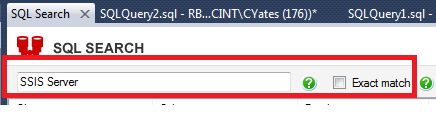
First thing I needed to do was fire up SQL Search inside SSMS. To do this and for the sake of explaining I will be showing this use case on my local, because well, we shouldn’t be showing the world our prod servers now should we! As you can see below firing up SQL Search is simple an easy. While on my local instance if I click on the SQL Search highlighted icon it will bring me to my SQL Search screen where I can then expound on my search criteria.

FiringUp

I had to define my search; I knew a phrase in my job but didn’t know the whole name….so with that said typing in what I knew and not selecting the exact match I knew would pull back the full job name; or so I thought.


Phrase

Now this is where it gets really good and makes the SQL Professor very happy. RedGate decided to go on and throw job search functionality into their updated utility. If you click on the All Object Type drop down you will see a Server Object called jobs. Simply go ahead and check that. Now for my use case I went on ahead and checked them all.

Jobs

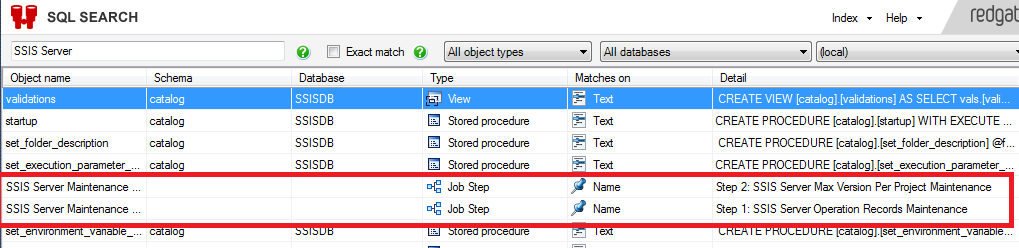
So, what have we done up to this point is type in our phrase, ensure the jobs server object is check then it’s giddy up and go time. After letting the search occur in all databases I find the results I’m looking for:

JobResults

My job name pulled back along with the actual step detail. Whoa wait, I had no clue I’d get the detail with it as well. Hats off RedGate this is something that every Data Professional can utilize and is a tool that saves time. It took me less than a minute to do a quick search and pull the information that I required.

Like What You See?

Listen, this just is one avenue in which RedGate has enhanced this product. I’m an everyday Data Professional that goes into work everyday and wants to work efficiently. Check this product out for yourself here

Some of the other enhancements made are:

  • Search in jobs
  • Select multiple object types and databases to search in
  • Improved indexing
  • Search with % wildcards
  • Search with Boolean operators

I tell you what; check out what my other colleagues have to say on the matter and how they have benefited from this utility:

If you want to read more about the newly released SQL Search, don’t forget to check out these blog posts:


On a SQL Collaboration Quest

Four SQL professionals gathered from the four corners of the world to share their SQL knowledge with each other and with their readers: Mickey Stuewe from California, USA, Chris Yates from Kentucky, USA, Julie Koesmarno from Canberra, Australia, and Jeffrey Verheul from Rotterdam, The Netherlands. They invite you to join them on their quest as they ask each other questions and seek out the answers in this collaborative blog series. Along the way, they will also include other SQL professionals to join in the collaboration.

Windows Functions; Who Knew?

CollaborateImage

SQL windows functions, it would seem, get lost in the shuffle most of the time when dealing with SQL. Why do you think that is? I honestly think that it is more or less developers, DBA’s, and data professionals are oblivious to some of the cool features that can be accomplished with its utilization. To put it simply windows functions could be viewed as looking in “windows” of your data. That is about as simple as an explanation as I received when I first started using these types of functions.

Example

Take the below table structure that I created on my local environment in SQL. My table name I created is called CustomerLog within that table I have two columns CustomerFirstName and CustomerLastName (represented below):

CustomerLog

For example(s) sake lets say I have a vast amount of data in this customer table and I want to partition it out and view just how many (categories) or windows I am looking at. This is where the windows function comes in nicely. With the below query I can find the results I am looking for pretty quick and easy:

Code

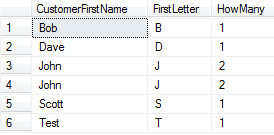
As you can garner with the above SQL windows function code you can derive how many customers share the same first letter in their name (result set below)

CustomerLogResult

Bottom Line

As you go through the SQL journey note that with any aggregate function being used you can turn that into a windows function by utilizing the over clause. You can only use windows functions though within the select or order by clause. This example only showed you how to partition using windows functions and only scratched the surface. It would behoove you to do some more research on what all you can do with SQL and window functions. Also, while you are at it; check out some of my colleagues as well

Mickey Stuewe: A Date At The End of The Month

Jeffrey Verheul: Write readable and high-performance queries with Window Functions

Julie Koesmarno: ABC Classification With SQL Server Window Function

Don’t sell yourself short. I guarantee once you start utilizing windows functions  you will want to use them everywhere. Just make sure you know the positives and negatives and as always just don’t blindly copy code from the net. Explore it, set something up on your Dev or VM sandbox. Failure to learn is not an option!


T-SQL Tuesday #051: Place Your Bets

SQL-Tuesday.jpgThis months T-SQL Tuesday block party is coming from the renowned Jason Brimhall (blog|twitter). You see each month a SQL Community member hosts this block party and this months theme is “Place Your Bets”.

So you want to gamble? Come on up to the SQL table and place your bets. Any Data Professional is welcome – junior level up to senior level all money is acceptable at the SQL table.

Okay, I’m in what are we betting on today. Well, you are in luck my friend today’s bet is on backups; sounds simple enough doesn’t it? Sure that sounds like fun I’m all in, well wait what about backups?

You’re lucky you asked, otherwise you’d be called a sucker and I’d just would have taken the all in to the house “Little Joe”.

The Scenario

It was a dark grey morning…oh wait that’s a different story. Let’s say you have a plethora of databases that are all business critical and you have automated tasks that backup these databases. If something happens while in the backup process and the process fails than a failure notification is sent out notifying the advantageous Data Professional that their process had failed and go take a look so you can fix it. All is well, right?  Most would say yes, some would say no, and then there is some, the gambler, who says who the heck cares. You have the backup process in place ~ Let’s Roll.

The Gamble

I bet on that scenario early on in my career. I went all in with the house and you know what, that didn’t pan out to well for me. Why you ask, well gambling on whether or not my backups were solid and good opened my eyes to something that I knew but didn’t really take into consideration in the beginning stages of my career. I had a critical database being backed up…phone rings. The proud DBA picks the phone up…yes we have an issue and we need to look at our backup for x date. Sure thing, I got it right here. I’ll restore it and we’ll take a look at it.

Go to restore and the backup is corrupt; initially I’m thinking well that isn’t good. It was then when I had to go back and tell the business that the backup was corrupt and I would need to go a day before or after to get the information – but wait Mr. Gambler what about T-Logs did you have those – um nope business deemed it not necessary and didn’t want to pay for space etc for the growth needed.

Conclusion

Even after taken precautions in my backups I still feel the strong need to ensure testing of the backups is being done whether it is through an automated process, spot checking, etc. Taking a backup is great, can that backup be restored? Are the settings on the backup set properly? If you can’t answer some or all of these then take time today to do some checking.

Each shop is different and will have it’s hurdles to climb. With that said are you all in? Do you want to take that gamble and bet against house? Business looks at backups as a safety net or in some cases really doesn’t care as long as you have them. To the Data Professional they are much more.

I’ve always been taught to work hard and hone your skill set; for me backups fall right into that line of thinking. Always keep improving, learn from your mistakes. From mistakes comes growth and don’t be afraid to fail. Many successes have come from failures or setbacks.

What is T-SQL Tuesday

T-SQL Tuesday is a monthly blog party hosted by a different blogger each month. This blog party was started by Adam Machanic (blog|twitter). You can take part by posting your own participating post that fits the topic of the month and follows the requirements below. Additionally, if you are interested in hosting a future T-SQL Tuesday, contact Adam Machanic on his blog.

T-SQL Tuesday #040: File and Filegroup Wisdom

SQL Tuesday

It’s that time again for the T-SQL Tuesday party! This party was created by none other than Adam Machanic (Twitter). If you are interested in hosting a party at some point this year give him a shout; you need to have participated in two T-SQL Tuesdays along the way and also maintain your own blog for at least 6 months.

Now that we have what the party is all about let’s get into what this month’s party is centered around Filegroups and his hosted by Jen McCown / MidnightDBA

My focus today is garnered toward indexes on filegroups and what they can do to your index strategy. I’m a big fan of having strategies when tackling issues, problems, or even believe it or not from the beginning of a project. Placing indexes on filegroups carefully can improve query performance (at the same time I want to note that indexes can also hurt performance in some situations so thorough testing needs to be taken into consideration).

Back from my 2008 R2 studies, if my memory serves me correctly, indexes are stored in the same filegroup by default; a non-partitioned clustered index and the associated table always reside in the same filegroup however you can do one of three things:

  1. You can partition both clustered and non clustered indexes to span multiple filegroups
  2. Create non clustered indexes on a filegroup
  3. Move a table from one filegroup to another

You can achieve performance gains by created non clustered indexes on a different filegroup if the filegroups are using different physical drives. The data and index information can be read in parallel by the multiple disk heads when the physical drives are on their own controllers.

One cannot foresee the access that will transpire or when it will happen, a better decision to spread your tables and indexes across all file groups might be of help. This would guarantee all disks are being used and accessed because all data and indexes would be spread evenly across all disks.

To bring this all back together you can think of a filegroup in its simplest of forms. Every database that you create has at least a data file and a log file, and every database has a primary filegroup. The filegroup contains the primary data file and any secondary files that are associated with it. One filegroup can contain multiple mdf/ndf files.

In the end I have seen significant gains with indexes being placed on specific filegroups, but as I stated before it is good to test all this out. Set up some scenarios on your test server and start doing some test cases to prove different theories and ideologies. One thing to remember as well is not every case is the same; ensure that the decisions you are making is good for what you are working on; never take a suggestion and drop it into a production environment. Prove the statement to be true or false no matter who it comes from.

Well, that’s a wrap for today’s party. Until next month…….

Select * Syndrome

NoSomething that I have seen lately over and over again and even ran into this morning is a practice that I would say is a pretty bad habit in SQL….the dreaded Select * syndrome

This method is heavily used for adhoc querying and I’ve seen it used in some troubleshooting scenarios but in my case I don’t have room for it in a production environment embedded in functions, procedures, or views.

To me it is a wasteful tactic in bringing back what is needed; it can produce unwanted scans or look-ups when in some cases all that is needed is index tuning. I’m a big fan of bringing back what you need instead of bringing back a tremendous amount of data. One can also make an argument for all the unused overhead it can produce.

I cannot begin to tell you the many times of deploying something out and then to find out the schema has changed and the select * in a view that was left in place years ago is my culprit from years of past coding that has been done.

For example; one that I have seen within the past couple of months is a view:

Select *

From table 1

Union All

Select *

From table2

This was being used quite frequently and is just asking for trouble and poor performance. There will always be excuses as to why it wasn’t done differently but in the end you will go back in and clean it up so it is best to think the process you are working on through in the beginning instead of the end.

Can I ever use it?

Sure….I’ve seen it used in If Exists clauses many times over and from my research and what I know SQL does not count this in the execution plans; if you leverage SQL the correct way it is more than powerful to handle what you need.

Tools to fight the good fight………

My source control is TFS and I like the newest version as you can set up controls that if a Select * is found it will break the build in dev forcing it to be resolved

If you haven’t already downloaded the free version check out the SQL Plan Explorer provided by SQL Sentry. Execute the tasks different ways with the select * and with pulling back designated columns and review the execution plan; you will be surprised at the outcome, and if you are old school that is fine too – analyze it in SSMS and see what you find.

To Document or Not To Document ~ That is the question

Recently, I approached a person in a business unit and asked if they had some standard documentation on one of their processes. The reply I received in general terms was, “No we do not have any standard documentation but we do continue to build on our processes”.

Knowing how I am, I began to read into it and I couldn’t get passed that statement. Then it dawned on me, of course everyone is different and we all have different mindsets. My DBA processes I feel must be documented, but others will not necessarily share that same view point – especially in other business units.

I’ve always heard that documenting is an age old battle; most people I know don’t like doing it but for me I do believe it is a necessity. I’m not the best at it but having standards in place within a team or solo act is beneficial for the next person that comes in. One of my old mentors several years ago told me if he walked out to lunch and something happened to him he would want me to be able to pick up a process even if I didn’t know it and look at his documentation and be comfortable in completing the task. Somewhere along the way that kind of stuck with me. Some of the standard documentation we have put in place for the DBA team that I’m on are:

  • Backup Procedures
  • Job Retention
  • Security
  • Maintenance
  • Server Installations
  • Code Promotions
  • Object Naming Conventions
  • Job Notifications

The list could go on but those are some high level ones that I just threw out there. Documentation made it on SQL Server Pedia’s “10 Things Every DBA Should Do” – the article came from John Sansom who really has a great blog; I suggest you check him out.

One of the things I like to do when starting new employment is to look at their documentation; some cases it doesn’t really exist. I like to take that and use it to gain knowledge of the systems and what they do. Documentation……”To Document or Not To Document ~ That is the question” To me it is a no brainer.

Drop me a line and let me know what your thoughts are if you think documentation is important or not important and some standards that you may have in place.