Passwords – A T-SQL Tuesday Topic

LateBeing engrossed with the daily tasks at hand I completely missed this month’s T-SQL Tuesday is being brought to you by Sebastian Meine Blog | Twitter.

Although the time frame has passed I would be amiss if I didn’t continue on my journey of joining in these block parties; with that said I’m going to write what I “would” have contributed. This month’s topic is intriguing in that it can cover a wide array of discussion – Passwords.

When I think of passwords I think of etiquette. I cannot tell you how many times I have been on calls, meetings, emails, and the list could go on of scenarios that relate to passwords where users just don’t think or take into consideration the impact of their actions. To me the last four words are the key, “impact of their (our) actions“.

Password Etiquette

  • Conference Calls – how many times have you been on a production call with numerous individuals and hear someone say, “Okay here is the user name and password?” If you have then you are not the only one. Credentials should be kept out of the hands of unnecessary individuals.
  • Open Text Passwords in tables – check into encrypting those; protect yourself before you realize breaches have occurred and you are left holding the bag.
  • Email – transmitting password information via email; not a big fan of. This kind of relates back to the conference call section; who all is on the email? Are you sending it to Project Managers and the like? Probably not the best choice to make.
  • Backups sent offsite – do you have any backups going off site? Is any pertinent credentials contained in the dB and if so are your backups being encrypted before shipping them off?
  • Length – Look at the length of the passwords you are creating; how strong is the password you are making?
  • Sharing – don’t do it; simple enough.

All the above reflects, what I deem, good etiquette. That barely scratches the surface. You have to take into consideration many other factors one of them being a policy.  Small, big, medium – whatever kind of shop you are in define out what the best practice is for your shop and then adhere to it. A good reference could be found on Technet Best Practices

Lastly, if you feel as though a password has been compromised be proactive and take the necessary steps to change it. Don’t wait for something to happen; you be the game changer.

Get your defense model in place and let the good times roll.

SQL Prompt 6.4 – Get It

SQLPrompt

This guy looks just like me a few weeks ago only one difference…..he has hair!!! Okay seriously though, I felt just like this guy not long ago and the reason for this was due to the fact I have become accustomed to specific tools and utilities that I utilize on a daily basis. Is this a good thing, eh, maybe or maybe not but end of the day I like to be efficient, dynamically nimble (if that is an expression), and in control of what my work entails daily.

Now, leading up to this extraordinary blog post you have to understand something. I’m in a RedGate shop pampered with some very nice utilities at my disposal. One such utility is their SQL Prompt utility.

One of the nice features I like about the utility is the recover tab within SSMS that shows me past history of tabs I had open within SQL. Can I tell you how many times this has come in handy? If that doesn’t meet your fancy then how about the code snippets that you can save and reuse later, or maybe the nice IntelliSense it provides while coding.

This leads me into why I looked like our Data Professional up above…..I recently was without my SQL Prompt and you thought I’d been taken back to the stone ages. I went to type out some code and low and behold nothing, I got NOTHING. No tables popping up; no columns to review…..nothing. After the sheer shock and awe subsided I knew I was in for a long day. Needless to say it didn’t take me long to figure out what went wrong with my prompt and how to get it back.

What’s this mean for you guys who are reading this? Glad you asked.

Red Gate’s new version is out so go check it out. Some of the new enhancements are noted below:

  • Execute current statement
  • Insert semicolons
  • Code highlighting
  • Use object definition case
  • Rename variables and aliases
  • Suggestions improvements
  • Qualify object names improvements
  • Remove square brackets
  • Nullability of columns
  • Choose environments to install to
  • New formatting options
  • New tab history options
  • Improved loading dialog box
  • Support for restricted accounts
  • Various usability improvements
  • Many bug fixes

So download the free trial and test drive it; what do you have to lose? Maybe you’ll like it and maybe you won’t but don’t wait and let time go by when you could be becoming more efficient in your everyday work.

If you use the product already drop me a line; if you don’t use the product then tell me why not.

What I Wish I Had Known Sooner…as a DBA

AttitudeYesterday I took a minute and to review some posts by some Data Professionals and in doing so I came across and article by Erin Stellato. She had been tagged by Mike Walsh who posted an article regarding 4 Attitudes I Wish I Had Earlier as a DBA

At the very end of Erin’s post she mentions “I’m not tagging anyone in this post by name, but if you’re thinking “I wish she had tagged me” then you’ve just been tagged.”

This spawned some thinking yesterday and last night; looking back I see growth, mistakes, resolutions, solutions, and much more that has brought me where I am today.  A lot has transpired; and I still have a lot more left to learn and understand.

Balance 

I have been told throughout the years I do not have an off switch. My mind is constantly running on things that may have occurred throughout the day, solutions to issues that I or someone has experienced recently, answers to forum questions, multiple projects running at the same time, and the list goes on. With that said you have to have some form of balance; I’ve seen many people burn out of the years and it is something that I’ve had to continually work on throughout my own career. Am I there yet – nope; but that’s okay. I’ve come along way in that area and will continue to work on it.

Flexibility

I’m the DBA what I say goes; it’s my way or the highway. Yeah that syndrome will end catastrophically and fast. Being a DBA (or as I like to say Data Professional) you encounter and work with many people from all faucets of business. It is almost a fine art of communication (which can be a point in and of itself), learning how to work together with other teams. Does this mean that you should not stand your ground for your beliefs – nope. What it does mean is that you will always see a gap; there has always been one. The network guys will blame the DBAs, the DBAs will blame the developers and network guys, the developers will blame the DBAs. It’s a constant endless loop.

End of the day, all the groups under the blanket of a company are in the same fight and on the same team regardless of if you are in networking, DBA land, development, phone systems – whatever the case is. We have to find a way to work together for the common good of the company.

Wrote a piece awhile back on bridging that gap

Provide Leadership Through Service

Last year I came across and article that Grant Fritchey wrote around Providing Leadership Through Service. This is something that has really resonated with me more so now to which I wish I would have learned earlier on in my career. Whether you are a contractor, own your own business, or work in a shop full time view your efforts as providing a service to the company you are with.  It will change how you view and reflect on your position; we should be humbled and honored to work within an environment we’ve been handed, but at the same time be bold and provide that leadership that companies so richly desire and seek

Learn To Say “NO”

No is not a bad word; although at times we think it is. Early on in my career I wanted to fix and do everything I could to help people. Don’t get me wrong; I still enjoy helping people. If you don’t learn to say no you will soon spread yourself to thin. This is a constant struggle that I still endure sometimes as I want to help everyone I meet with questions, projects, etc. The growth that I have had over the years has taught me to do the helping more methodical. At times I do have to say no, and that’s okay.

Conclusion

Well there you have it; not very fancy but is from the heart and from a data professional who realizes he will never be perfect but will continue to grow on this SQL journey.

I’m not tagging anyone but offering the same avenue that I was given. If you’d like to blog about what Mike has presented then by all means; give it a go.

Thanks Mike for getting this started; brought back some fond memories for myself.

ISPACs – Got To Love Em

Being a DBA and working with various teams, I have become accustomed to deploying SSIS packages. I’ll even go back further and, dare I say, DTS packages (I hope everyone did not just fall on the floor while reading that). Now-a-days this Database Professional does more deploying packages than developing them; with that said I was pleased when 2012 came along.

When the newer version of SSIS was released it offered several new features, one of those features was building a deployment model thus producing an ISPAC file. I remember first coming across this and thinking, “Wow, this is all packaged up”. While I won’t go into the specifics of how to build the deployment I will show you the step by step process of deploying the ISPAC file.

Step 1

Locate the ISPAC file. Once located double click on the ISPAC file to gain entry into the deployment wizard.

Ispac


Step 2

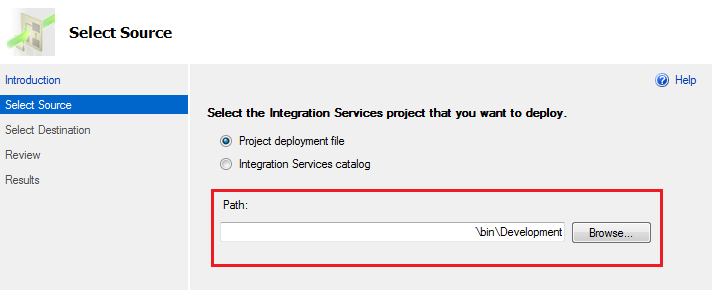
What kind of Integration Services project do you want to deploy? Since we are dealing with an ISPAC file on our local directory we will select the source path we found from Step 1. Simply browse to the path location and click ok.

Source


Step 3

So you have your ISPAC file selected and you want to deploy it; where does it go? You have the capability to supply any Server Name for rapid deployment. The path reflects the SSISDB catalog which is required for SSIS 2012 packages to be deployed. If your SSIS package is already on the server you can simply choose to overwrite the existing file at deployment time.

Destination


Step 4

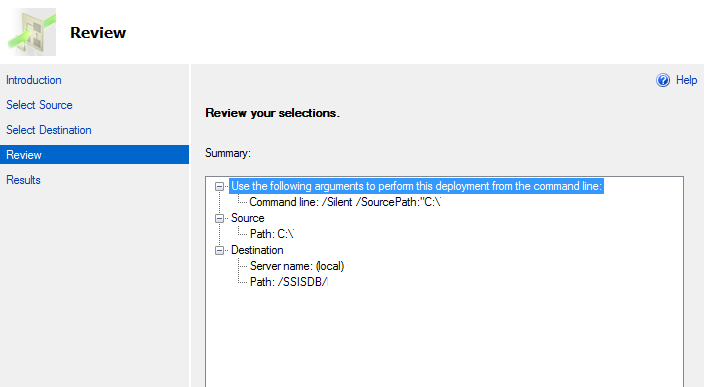
After you select the destination path; it is then time for review. The review section will provide you with a great overview of the Source path of the file being deployed and the destination location.

Review

Step 5

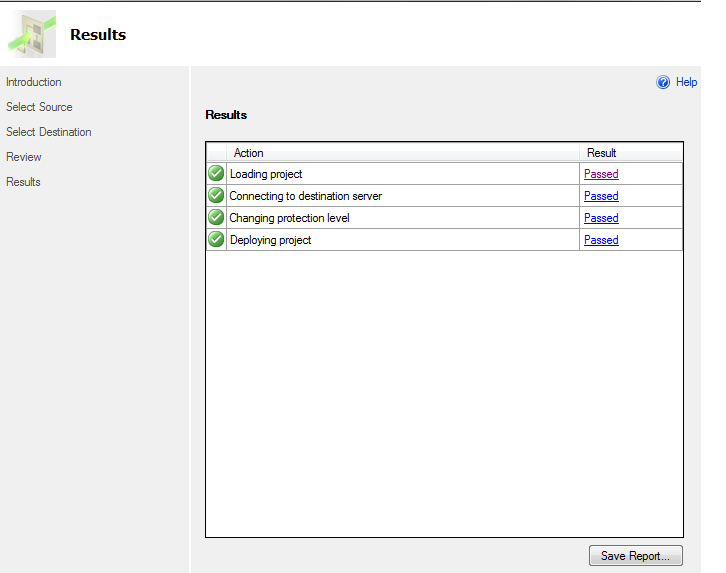
Once verified and the deployment button is hit we are off to the races. The ability to have quick insight into the deployment and the methodology to save the report for future use is stellar. If your deployment did fail; at this step you would be able to dive into the error in the result pain on the right hand side.

Deploy


Seems simple enough? The deployment method in SSIS 2012 has proved beneficial for myself and is a welcomed aspect. Earlier this year I completed a post on the utilization of PowerShell and how to deploy 2012 SSIS packages and that can be found here.

I tell you what; check out what my other colleagues have to say on something they learned recently around SSIS:


CollaborateImageOn a SQL Collaboration Quest

Four SQL professionals gathered from the four corners of the world to share their SQL knowledge with each other and with their readers: Mickey Stuewe from California, USA, Chris Yates from Kentucky, USA, Julie Koesmarno from Canberra, Australia, and Jeffrey Verheul from Rotterdam, The Netherlands. They invite you to join them on their quest as they ask each other questions and seek out the answers in this collaborative blog series. Along the way, they will also include other SQL professionals to join in the collaboration.

And Just Like That….Three Years

Time

Time is a constant. Anything and everything requires time it seems, and with that said I received a reminder today that three years have passed since I first started this adventure called blogging.


With this blog you will not find perfection, instead you will find a Data Professional who has grown more over the last three years of his career than he did the first ten. Is it by sheer circumstance? No, I don’t believe so. Don’t get me wrong; learning my first ten years was ongoing; I just wasn’t prepared for what the last three years had in store for me. Looking back I see phenomenal people who took a chance on me both from my career standpoint and from a community standpoint. People who pushed me never to give up when things didn’t necessarily go the way I would have liked for them to; or the countless hours of advice I would seek out from people who graciously pointed me in the right direction.


Attending PASS Summit 2011 was the career changer for me. Inspiration and collaboration ensued when I arrived back home and it has been an enjoyable ride. The blog has morphed from infancy (The SQL Corner) to what it is today (The SQL Professor). With steady growth over the past three years I’m pleased with the reception it has gotten and look forward to the future and what it holds.


I used to get discouraged at the quantity I was producing; I quickly realized that it isn’t quantity it is quality and that content is key and cannot be substituted. One of my favorite blog posts wasn’t even a technical post; no it was one of influential people that have helped me in my career and more so in the past three years. Investing time in others, writing, and continual learning will be my focus this upcoming year; focusing a lot more on the quality of content.


It’s an honor and privilege to blog about my SQL adventures as a Data Professional. I won’t always be perfect, but as with anything you’ll get a Data Professional who will give a 110% and try to provide solutions to everyday issues that are incurred in work life situations. I recently re-read an article by Grant Fritchey (Blog|Twitter) – Leadership Through Service; this is something that has resonated with me and is a thought that is a good basis for a strong foundation. I want to view this upcoming year as such “Leadership Through Service”


 I would be amiss if I didn’t thank Chris Shaw (Blog|Twitter) and John Sansom (Blog|Twitter) for investing time in me and pushing me to continue to grow and get better. I could easily throw an additional 10-12 people in there  but the two I mentioned have stood by me. They’ve seen me grow, stumble, fall, picked me up, and encouraged me along my journey. Is that not what our Community is about? If we continue to reach one person and that person reaches one person the SQL Community will continue to grow and thrive.


Time is a constant. Time is passing by. What will you make of your time?

T-SQL Tuesday #57 – SQL Family and Community

SQL-Tuesday.jpgMaybe it is just me, but these monthly block parties seem to be coming around quicker and quicker as time continues to fly by. My good friend Jeffrey Verheul (Blog | @DefJef) is getting the opportunity to host this month and he wants to know about “SQL Family and the Community”.

If you have been around SQL long enough you will find out that the terms SQL Family and Community are mentioned often. For me, and my experiences, it is a close knit group of data professionals that are willing to share their life experiences, everyday issues, problems solving skills, idea bouncing, and much more. I have been involved with SQL for over 14 years now and only the last 4 years have I been active in the community; not because I didn’t want to, but I was not privy to the magnitude of how far the SQL Family and Community reach is.

It’s no secret for those who know me. I’m sports oriented; having played baseball, football, soccer, and basketball my whole life and then college basketball I’ve been around team oriented methodologies my whole life. That background has it’s pros and cons, but the disciplines and insights I garnered from those experiences has fit nicely with being a Data Professional.

Having those days behind me for the most part (yes I am an avid runner still and do partake in a good game of basketball at times) my team now is the SQL Community.

Pre-Game

Preparing for a big game you have to look at the whole picture. Countless hours of practice, repetition, running play after play goes into a season not to mention conditioning. The camaraderie built during those times with your teammates enables you to trust them on the court. Guess what, being a data professional you have to be all in. To me that means continuous work day in and day out to help hone your skill set, and part of that work has been working with the SQL Community and Family.

The Game

G-A-M-E-T-I-M-E

The day of the game is here and it’s go time. You look at your teammates (SQL Community) and you are in a huddle right before tip off. The opponent is huge, a foot taller than your tallest guy, yet you are determined. This is what you’ve prepared for. Will you rise to the challenge?

  • You will get assists in your career where you were stumped and didn’t have a clue; then someone from the SQL Community will provide you with that spark that enables you to get over the hump.
  • You will grab that rebound when someone, other than you is stumped, and pick that person up when they need help.
  • You will block that shot when a someone is wanting SA rights to your server.

When your number is called to come into the game (becoming active in the SQL Community) will you answer the call? Will you come into the game with an attitude of we got this? Have you prepared?

Outcome of Game

A team is just that; a team. I remember vividly to a point in time when we were in the off season, but conditioning. We had already completed multiple wind sprints and were wrapping up running intervals. Getting to the finish line we looked back and one of our teammates was struggling. He was to the point of running then stopping; did we leave him out there? A resounding NO – the ones that finished ran back out and surrounded our teammate. He was part of our team and no way were we going to let him struggle alone, and hopefully; we could give him the confidence to finish. That to me epitomizes the SQL family and community. Sure we are a finicky bunch at times, frustration occurs, and we don’t always get along. That happens on every team; however at the end of the day we have each others back. We win as a team and lose as a team.

Summary

If you are not active in the SQL Community then you are missing out. It’s time; the horn has sounded and the game is on. Time is ticking down; will you get in the game? A saying that a coach told me a long time ago has stuck with me ~ “Somewhere someone is practicing getting better; what will you be doing?” Let’s make this Community the best we can.

What is T-SQL Tuesday

T-SQL Tuesday is a recurring blog party, that was started by Adam Machanic (Blog | @AdamMachanic). Each month a blog will host the party, and everyone that want’s to can write a blog about a specific subject. If you are interested and have been blogging for a bit drop Adam a line.

SQL Prompt – The Power Within

*Photo by Red Gate

*Photo by Red Gate

Come a little closer; no seriously come on over just a little closer as I don’t want to you to miss this. Can you hear me? Good, listen if you are in this Data Professional game for very long than you will have some “go to” utilities when you need them. Over my 14 year career thus far I’ve accumulated many scripts, procedures, techniques, and vendor related products.

One product that has remained steadfast for me over the past several years is Red Gates’ SQL Prompt. If you are already using this utility than you know what I am talking about; if you haven’t then you are missing out. I’m continuously amazed at some of the options the product contains. A brief overview and you will find the following:

  • IntelliSense-style code completion
  • Customizable code formatting
  • Save code snippets
  • Refactor SQL code
  • Tab History – save, search, and recover tabs in SSMS

Why did I bold Tab History you may ask? Well pull up a chair, sit down, and listen up.

The Setting

Have you ever had one of those mornings where you wished you would have stayed in bed, perhaps one might call it a “do over”. Well that was me not long ago; the day was actually fitting as the rain was pouring, had no umbrella present, and forgot the ole key card to the shop. For the ones that know me also know that I quit drinking coffee a while back. Ha, yes, I usually get the jaw drops for fellow co-workers and beyond; if there ever was a day I needed some then it was that day.

I sit down, fire up the laptop, and off we go. I starting looking at my plate and opening up a script I had saved the previous day; or had I?!?!? I go to my repository and nothing, absolutely nothing. As I mutter the words to myself, you got to be kidding me, I dive further into my folder structure thinking I might have misplaced it. Aha (there will be more coming in a future post about this little word), I know what let’s open SSMS and check the most recent files. I know I saved it the day before and I probably just put it in the wrong place. Wait, what, wait a minute – nothing there either.

Well this day is just off to a great start; isn’t it?

The Power Within

As I stand up and start walking to the break room to clear my head, get back on track, and re-asses the events thus far I remember something. SQL Prompt has a built in feature that might save the day. I come back to my desk and look at the following:

Tab History

Tab History – two words. Who knew that they would be so important on a day that started off bleak. I click on the Tab History and complete a search of the word “local” since I knew what was inside the script:

Info


Scrolling down through on SQLQuery7 I found my script I was looking for! Yes, if you heard a loud clasp of thunder or the earth moving some more on it’s axis that was me doing a SQL Happy Dance. This one feature saved my bacon due to deadlines that I had to meet the next day.

While this utility is a nice feature, we need to look at the utility in terms of a broader scope. SQL Prompt offers much more.

  • Allowing the ability to write code more smoothly
  • You can customize your SQL Code formatting rules
  • Affords you the ability to save code snippets and better yet share them across your team
  • Refactors SQL code
  • Exploration of your database (another feature I like)

Conclusion

A data professional is always looking for ways to improve their processes and become more efficient. SQL Prompt is a utility that accomplishes that goal. If you are a seasoned vet of it then great; however if you have never tried it then give it a go. You will be glad you did.

I tell you what; check out what my other colleagues have to say on something they learned recently:

On a SQL Collaboration Quest

Four SQL professionals gathered from the four corners of the world to share their SQL knowledge with each other and with their readers: Mickey Stuewe from California, USA, Chris Yates from Kentucky, USA, Julie Koesmarno from Canberra, Australia, and Jeffrey Verheul from Rotterdam, The Netherlands. They invite you to join them on their quest as they ask each other questions and seek out the answers in this collaborative blog series. Along the way, they will also include other SQL professionals to join in the collaboration.


T-SQL Tuesday #56 – Assumptions

SQL-Tuesday.jpgQuestion: “What time is it?”

Answer: “T-SQL Tuesday time”

Question: “What time?”

Answer: “T-SQL Tuesday time”

“I can’t hear you?!?!?!”

That’s right; it’s that time again where we come together for a block party T-SQL Tuesday #56 style; which this month is hosted by Dev Nambi (blog | twitter). Dev has garnered a topic around what assumptions we make in our work environment within the realm of SQL.

The Assumption

One of the biggest assumptions I’ve come into contact in many places is the saying, “I’m only as good as my last backup”. While that is a semi true statement it does leave the process unfinished. Let me explain:

Johnny (picked a name out of the air) is given a task to create a new database and with that he designs his maintenance strategy. Backups fall into that maintenance strategy. The new mechanism to take a backup is put into place and we are set; full backups set to run off hours.

At least this is what a lot of data professionals assume; taking a form of backup is fantastic. This post is not meant to go into the details of how to take a backup but based on the assumption that your backups are good. The second half to the equation is restoring those backups.

What? You mean I need to actually test my backup to see if it works. Yes that is exactly what I mean. I have seen several cases where backups are taken and everyone sleeps at night. Then the business unit decides they want to pull that backup; you go to restore the backup and the file is corrupt.

Summary

Don’t just assume that your backups are ready to go. Take a more proactive approach and test your backups. Granted each shop is different with their own standards and regulations; with that said if someone asked you to restore your backup……could you with confidence?

What Is T-SQL Tuesday

T-SQL Tuesday was created by the mighty Adam Machanic ( Blog | Twitter); if you are interesting in hosting a T-SQL Tuesday party or want to learn more about it check out his blog. Let’s get involved and make our community that much better.

Worst Day As A DBA

5Worst_FoRG-banner_613x90_ChrisYates_V1

I remember the day pretty vividly, it was in the summer months and I was as green as green can be coming into the technology field. Walking through the doors to the start of my career  I was ready to tackle the world. The training for new hire sessions had already been completed and it was game time. I didn’t know what a SQL High Five meant at the time but I would have given one to everybody as that is how I was feeling walking through the doors.

The introductions began and I got the normal “new guy”, “fresh meat”, “greenhorn” labels that most people call newbies. As we turned the corner I noticed something that looked a bit off to me. A pen cap stuck in the keyboard by one of the developers. Hmm that is odd, they didn’t teach anything about pen caps in keyboards in college. That person was not at their desk at the time but we did find them in the break room and he was introduced to me as one of the developers.

Time past and the introductions complete I went back to my desk in my little cubicle and couldn’t help but think back to that pen cap. The curiosity was too great so off I go; back over to the desk with the pen cap, mind you this is about an hour later.

Hey man, I got to ask you a question. What’s up with that pen cap?

“Oh, yeah I was building an import process and I forgot and left a MSG box in there. I started to load the files in and instead of stopping it I figured this was a quick way to get through it.”

Hmm, interesting tactic but the red flags and sirens started to go off in my head. Being the new kid on the street and the youngster I went to one of my peers and started poking around a bit. Explaining what I saw I was amazed to learn that this in fact had happened before.

“Before”, little did I know those 6 letters would start to build the foundation of my DBA career. What, wait a minute….”before” you say? Yeah, ole Billy (no not his real name) over there has done that “before”. Nice, so I go back to my desk again and sit down. I take out a pen and paper and start writing down my questions.

1. Where is Billy loading this data?

2. What kind of data is Billy loading?

3. What kind of access does Billy have?

4. Does my boss know this?

5. What method is being used to import the data?

6. Who is the business owner?

Now realize I hadn’t even turned my computer on yet to get the lay of the land. Off I go with my questions.

Um Hey Billy, just out of curiosity where you loading that data? Prod he replies

My heart sunk, I knew the writing on the walls and where this was going. What kind of data are you using? Client data for our system. Back to my desk I go; sit down flip on the computer. I started researching, digging, and sure enough my thoughts were now a reality.

Dev Ops had gone rogue and had access directly to prod. Remember the pen cap; well after realizing that the import was loading more data than the file had in it we discovered the app didn’t have a stopping mechanism and no duplicate checks. In the end we were loading a 100,000 record file 8 times!

Light bulb goes off in my head, as I turn to colleague. Hey where is the last backup? It is on x drive but it won’t do you no good. Why is that I ask; yeah it’s a week old. We run them manually before we leave for the day.

In the end that worst day started off my worst week but looking back I believe that worst day started the groundwork for a solid foundation. How or why is that you ask?

1. Security – I’m a huge proponent of it and probably rightfully so after enduring the major cleanup that ensued.

2. Documentation – no documentation was found anywhere; we all can do a better job of this; me included.

3. Don’t be afraid to speak up; if something is off to you question it. Research it. Dig in and figure it out.

4. Just because something is done one way for years doesn’t mean it is the right way. Evolve and become more efficient. Do you think having a pen cap on an enter key to load data is efficient?

5. If you are a newbie and seasoned vet review your systems on a routine scheduled basis.

6. Backups – are you taking them? If so are you in turn testing them or validating them?

Some of the things I know now that I didn’t then are handy utilities such as Red Gate’s SQL Backup Pro that could have benefited me; take a look at their arsenal for the data professional. A wide range of products that will allow you to streamline your processes and tasks.

I look back on my time there and we brought it so far. We righted the ship but it was no easy task and is not for the faint of heart. It taught me to chip away at the wrongs and turn them to rights. I speak a lot about being a game changer. That means if you see something amiss go after it. Make it right.

While I have had a few “worst” days since then, I’ve learned one thing about being a Data Professional ~ being one comes with a price tag of having great responsibility. Don’t abuse it.


5worst_1_300x250_NEW

PASS Summit – What Does It Mean To Me?

PASS_14_Google_240x400 (1)PASS Summitwhat does it mean to me? So listen, I’m not perfect. I will never claim to be and you will never her me utter those words. I make mistakes every day, but I try to learn from those mistakes as much as possible.

I was asked by several people yesterday via email and word of mouth conversations what PASS Summit meant to me and how are community is. During the work day I was not able to keep up with all the happenings since session selections came out, but I did catch quite a bit on my feed. Since being approached and being just one voice in this big game I thought it prudent to share with others what PASS Summit has meant to me.

For me personally, PASS Summit changed my career. I rolled into town (Seattle) back in 2011 not sure what to expect. Brand new to this scene; I didn’t know anyone from anybody. I can still remember to this day walking into the convention center thinking to myself, “What in the world did I get myself into?”

Each session I went to seemed to give me something I could take back and incorporate into my job. I was able to meet and interact with fellow colleagues in technology from all over the world. It exposed me to another part of what we call “The SQL Family” I had not known before.

I can recall purchasing the Deep Dives book and introducing myself to all the MVP contributors. Eating breakfast and lunch with 5000 people before going to learn and try to enhance my skill set. It lit a fire in me for my career that I hadn’t had before. Some of the techniques learned then are still part of my everyday work now. So, as you can see the PASS Summit has meant a great deal to me and where I am at today.

Fast forwarding to today; what spawned these questions to me by others stems from session selection discussions. I will not dive into processes or procedures as I am not privy to the background and the inner workings of selection of sessions. That’s not my goal nor do I want it to be with this post. I see many points some valid and some not in my opinion; however I do believe that is part of being a SQL Family / community. We can share our thoughts, opinions, concerns and review processes, policies, and procedures. It is the basis and foundation on how we grow and improve. At the end of the day we are all in this together.

I look forward to attending this year and learning from a great group of speakers. Heck all the volunteers, speakers, attendees take time out of their families lives, work schedules, and the like to attend. It is definitely a unique environment and one that I hope can continue to grow and overcome hurdles.  Who knows I hope in the very near future my session is selected maybe then I to can share what I’ve learned along my journey.

Looking back I can honestly say the conference in its entirety changed my career, my outlook, and my drive. I don’t have all the answers but I will continue to give it all I got day in and day out, and from a past attendee I thank all the speakers (both old and new) and the volunteers that make this happen.

What about you? What do you think about PASS Summit? What are some of your opinions on the process for selections? Can we improve; if so how?